• Hey Guest. Check out your NeoGAF Wrapped 2025 results here!

Lifelong consoleplayer needs help with buying a PC.

To each to their own, I find there's a lot of friction points with that, you have to flip over to a wireless mouse and keyboard often to do basic things in Windows.

Imagine you're coming from a console, where you can wake the system up with a controller, and it boots directly into the console UI. And now you have to fiddle with things on PC every time you want to play a game.. it seems small, but it's death by a thousand cuts for daily use.

SteamOS is going to replicate console like use case much better than Windows can currently. I think windows works best with a computer monitor at a desk currently.

the-rock-eyeroll.gif


You can use Steam Big Picture mode, Xbox Full Screen Experience, controllers analog sticks and/or track pads too, etc etc...
 
To each to their own, I find there's a lot of friction points with that, you have to flip over to a wireless mouse and keyboard often to do basic things in Windows.

Imagine you're coming from a console, where you can wake the system up with a controller, and it boots directly into the console UI. And now you have to fiddle with things on PC every time you want to play a game.. it seems small, but it's death by a thousand cuts for daily use.

SteamOS is going to replicate console like use case much better than Windows can currently. I think windows works best with a computer monitor at a desk currently.

I don't know if you have actually used SteamOS but PC games can be fiddly no matter what operating system. It's even worse when you actually need to fiddle with something beneath the console like UI. I swear the file system for games using Proton is a clusterfuck.
 
To each to their own, I find there's a lot of friction points with that, you have to flip over to a wireless mouse and keyboard often to do basic things in Windows.

Imagine you're coming from a console, where you can wake the system up with a controller, and it boots directly into the console UI. And now you have to fiddle with things on PC every time you want to play a game.. it seems small, but it's death by a thousand cuts for daily use.

SteamOS is going to replicate console like use case much better than Windows can currently. I think windows works best with a computer monitor at a desk currently.
I solved this by using a wireless keyboard with a built-in touchpad. I use the gamepad for storefronts and gaming, while the wireless keyboard handles adjusting RivaTuner profiles and using the Nvidia app. I think this is essential on a PC, though it's no big deal. It will only offer a truly console-like experience if we play PC games on dedicated hardware—like the Steam Machine (which is very entry-level) or the upcoming Xbox Helix, provided it supports Steam.
 
I solved this by using a wireless keyboard with a built-in touchpad. I use the gamepad for storefronts and gaming, while the wireless keyboard handles adjusting RivaTuner profiles and using the Nvidia app. I think this is essential on a PC, though it's no big deal. It will only offer a truly console-like experience if we play PC games on dedicated hardware—like the Steam Machine (which is very entry-level) or the upcoming Xbox Helix, provided it supports Steam.

71IEYcGW6jL._AC_SL1500_.jpg
 
I'll alleviate you of one of your fears off the bat. Prices will not come down. They will, at best, stabilize (and that's like a 3+ year out timeframe). You don't have to buy right now, but don't hold out hopes for a 50% price drop from a speculative market crash.

You've also really helped by providing an example of the types of games you want to play. VR gaming can be graphically demanding, but not necessarily so much as if you wanted to play games at the highest graphics fidelity.

My suggestion would be to go with a prebuilt, to reduce the complexity of your purchase. Then, as far as GPU cards go, you should probably aim for around the Nvidia 5070TI or AMD 9070XT. In any case, you'll want a GPU with the higher end of VRAM availability 12~16GBs+. The reason being that VR games tend to render a lot of textures very close up, constantly, meaning they tend to chew through the VRAM cache.
 
the-rock-eyeroll.gif


You can use Steam Big Picture mode, Xbox Full Screen Experience, controllers analog sticks and/or track pads too, etc etc...
"You can solve this by doing all this extra stuff"

That's exactly the friction I'm talking about.

Also steam big picture mode and Xbox full screen experience by default both react to the controller menu button, so you press it once, and both interfaces activate at the same time, conflicting with each other. It's really messy.

All of this is solvable, but it takes a lot of fiddling and configuration to get it to, at best, approximate a console like experience.

You're misleading people by understating these barriers, pc gaming on Windows 11 is not comparable to the console experience, especially for new users expecting to plug and play.
 
Last edited:
If you can, definitely build it yourself. It's really fun. You will a feel a sense of accomplishment when you build that first one yourself. Just pay attention to everything you're doing and read your motherboard manual. Ask questions on here if you have to.

Also, Steam Big Picture Mode will give you a console style experience on PC so you can hook it up to any big screen tv. The UI for Steam Big Picture Mode is excellent. You can also add games you bought on other stores (like GOG) to your Steam library as a non Steam game to make everything all in once place.

The best thing about PC gaming is the amount of things you can do with it. It will open whole new door in gaming for you. It has backwards compatibility for generations so you can dive into those old games you might have played on console, but now with 4k resolution and 120+fps. Those games are pretty much "Remasters".

You can also pretty much use any controller you want. If you plan on using a PS5 controller, I highly recommend making your own Dualsense wireless dongle. I made one recently and it has been excellent. It only cost me a little over $10 for the case and Raspberry Pi Pico 2W board. It gives you all the features of the Dualsense wirelessly on PC that are normally only functional via wired USB. You can read more about that here in this thread: https://www.neogaf.com/threads/redd...speaker-and-full-functionality-on-pc.1696533/
 
Unpopular opinion but u may want to consider a prebuilt pc too. It isnt the cheapest option, but you dont need to be as sophisticated in the technical aspects, everything will ideally work out of the box, and it will save you a lot of time. Building your own pc is ideal for many reasons, but not always the best fit for everyone
 
I'll alleviate you of one of your fears off the bat. Prices will not come down. They will, at best, stabilize (and that's like a 3+ year out timeframe). You don't have to buy right now, but don't hold out hopes for a 50% price drop from a speculative market crash.

You've also really helped by providing an example of the types of games you want to play. VR gaming can be graphically demanding, but not necessarily so much as if you wanted to play games at the highest graphics fidelity.

My suggestion would be to go with a prebuilt, to reduce the complexity of your purchase. Then, as far as GPU cards go, you should probably aim for around the Nvidia 5070TI or AMD 9070XT. In any case, you'll want a GPU with the higher end of VRAM availability 12~16GBs+. The reason being that VR games tend to render a lot of textures very close up, constantly, meaning they tend to chew through the VRAM cache.

Ok, thanks, i am using this site; https://komponentkoll.se/komponenter/processor to build my own pc.

Any tips on CPU, mother board, cooling? Power?
 
I dont know if this is ok, i hope so, and bare with me as english aint my native language.

Well then, i bought my first console 40 years ago, i always loved playing on console and still do, never had any interest in PC until now.

I am giving up consoles in the future except Nintendos.

So i am trying to read and learn as much as i can, i dont know that much about all the components etc and it feels like a jungle, and my first question is; i dont need it right now, maybe in 2-3 year, is it smart to wait or is it better to buy one asap? Some say prices will go down but I dont know about that...

I know that memory etc cost a lot now because of ai.

I am sure there is a lot of talented people here that can give me some tips on what to buy.

I am really deep in VR since +10 years that is one thing, it has to be really good for vrgaming, i have both psvr2 and Quest 3 so the plan is to use probably q3 with the PC.

Budget around 2000$

I am very happy if you want to guide me into this new path in my life : )
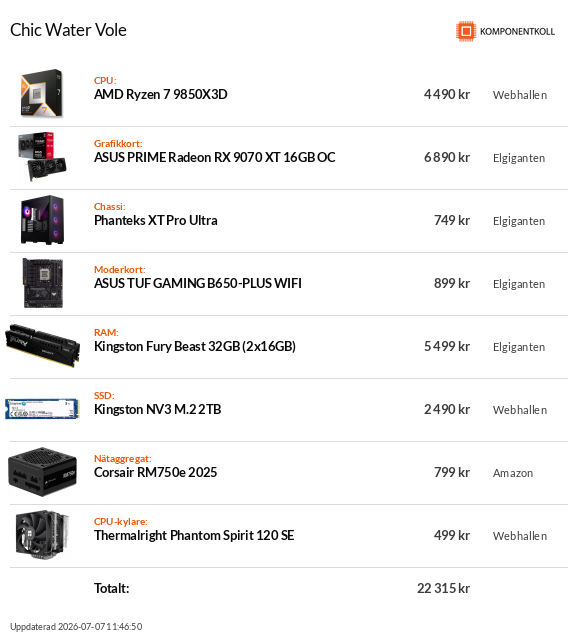
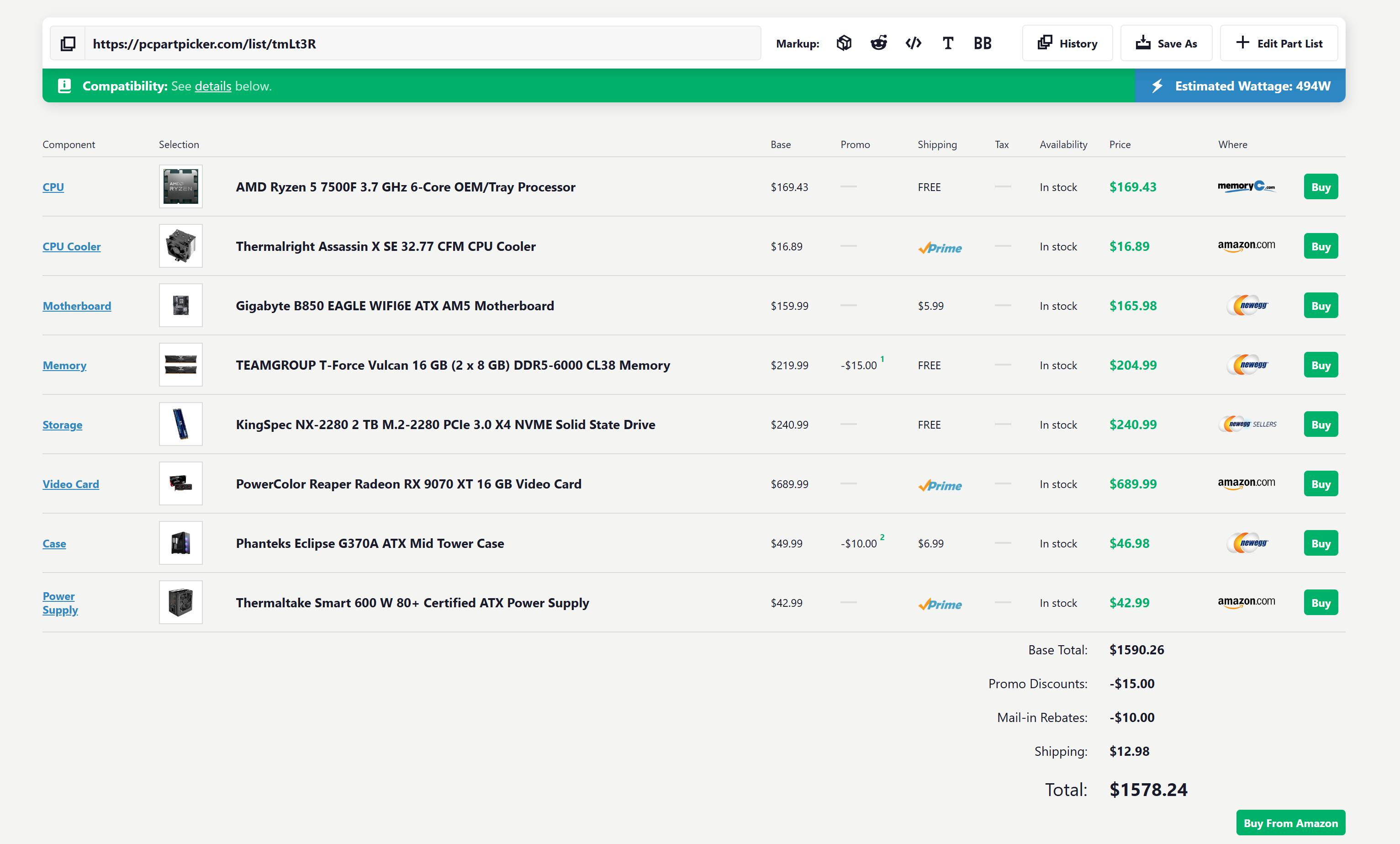
Here's a decent PC (in sweden) , for the price you mentioned, with 32 gb ram, 2tb Ssd and a 9070 XT. You have to build it yourself, but thats pretty easy and a lot of fun.

 
Last edited:
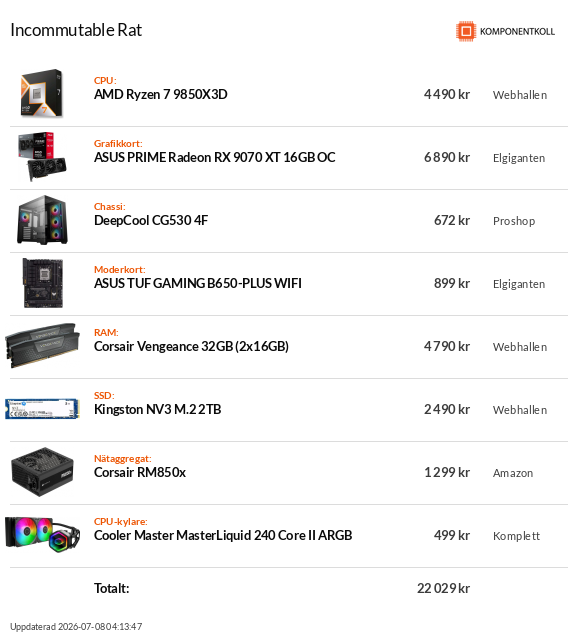
Some small changes: i might order today...


Have to build myself though
Check if that store doesnt have a service where they build pc for u, usually its relatively cheap, below 50$ for sure, here in poland similar stores have such a serice, since u are first time pc owner there is quite a few mistakes u can make by building ur own, and that will cost u since those are all highend components u ordered.
 
Check if that store doesnt have a service where they build pc for u, usually its relatively cheap, below 50$ for sure, here in poland similar stores have such a serice, since u are first time pc owner there is quite a few mistakes u can make by building ur own, and that will cost u since those are all highend components u ordered.

I also wonder if that mobo supports 9850x3d out of the box, it probably needs bios update.


Need that rgb
That's a good build.

I will mention that for a rig with front intake cooling, you don't get a practical benefit from a liquid cooler (their water tubing can be a point of failure).

As for your previous question about mothetboard and CPU, my only suggestion is making sure the motherboard chipset matches your intended CPU, which it looks like you've done.
 
"You can solve this by doing all this extra stuff"

That's exactly the friction I'm talking about.

Also steam big picture mode and Xbox full screen experience by default both react to the controller menu button, so you press it once, and both interfaces activate at the same time, conflicting with each other. It's really messy.

All of this is solvable, but it takes a lot of fiddling and configuration to get it to, at best, approximate a console like experience.

You're misleading people by understating these barriers, pc gaming on Windows 11 is not comparable to the console experience, especially for new users expecting to plug and play.
You will use one or another, not both.

No one is saying it's comparable to console experience (and gladly it's not as console navigation with dpad sucks, thank God Switch has touch screen to help). It's about navigating Windows interface the way you prefer.
 
That's a good build.

I will mention that for a rig with front intake cooling, you don't get a practical benefit from a liquid cooler (their water tubing can be a point of failure).

As for your previous question about mothetboard and CPU, my only suggestion is making sure the motherboard chipset matches your intended CPU, which it looks like you've done.
Tips on a better cooler?
 
Yups, gotta wait till mid 2027 and beyond if u can somewhat get by for now, if not then it cant be helped.

I'm good for a while I think? My current build is a few years old now, but;

Nvidia 5080
32gb Vengence DDR5
Ryzen 9800x3d (mild overclock)

in a water cooled system for a bit more longevity. Heat kills rigs faster. I can currently run most things on high / ultra settings on ultrawide, good enough for me. I don't see any major graphical jumps in the near term that will require a system upgrade
 
Last edited:


Need that rgb
Save a few pennies by downgrading to 9800x3d, the extra 100Mhz from 9850 does nothing.
I would avoid Kingston NV-series SSDs. They use bottom of the barrel flash and controllers, and the parts list varies batch by batch so if somebody is having no issues you might end up with a drive that has different components in it and a lot of problems. Also it might be QLC NAND which would make it painfully slow as operating system SSD.
 
If I were building today and wanted to go cheap, I'd buy used generic SSD and ram from ebay from a reputable seller. I'd go DDR4 instead of DDR5. 5700x or 5800x3D. At higher rez gaming, that's fine.

What do folks think is the best gpu, bang for your buck, for 4k gaming? 5070 ti? 1440p.....5060 ti?
 
Last edited:
bare with me

Very bold of you, but I ain't getting naked with you BUDDY. ;)

I'm a console head too, but I'm also in the process of trying to buy a PC, I'm mostly done with Playstation, frustrations have been bubbling up for a while now, so good luck to you man.

Yups, gotta wait till mid 2027 and beyond if u can somewhat get by for now, if not then it cant be helped.

Is there any indication that prices will drop, and if so, those drop will even be significant? If anything, I'd be worried they'll go even further as manufacturares turn away from consumer goods to focus production on data centers.
 
Last edited:


Need that rgb

Fuck water cooling btw. You'll never have something more reliable than a big block of radiator + quiet fans. I've seen too many AIO fails to ever risk my rig with that shit. Water cooling is interesting in really really small SFF cases where nothing else fits, you're basically putting that in a giant case for almost no thermal gains but all the risks.
 
Very bold of you, but I ain't getting naked with you BUDDY. ;)

I'm a console head too, but I'm also in the process of trying to buy a PC, I'm mostly done with Playstation, frustrations have been bubbling up for a while now, so good luck to you man.


Is there any indication that prices will drop, and if so, those drop will even be significant? If anything, I'd be worried they'll go even further as manufacturares turn away from consumer goods to focus production on data centers.
Unlikely, but sometime in 2027 u will know official ps6 price/specs/launchdate and u will know exact specs(price, perf uplift) of zen6 cpu, nvidia 6000 gpus and amd rdna5 gpus, thats all crucial data when preparing for nextgen, u dont wanna be left in the dust by chosing wrong specs for ur gaming mashine...
 
I think 5070 with 16GB of system memory would be a better "now" system. You can always add another RAM stick later, but I wonder how long 12GB of VRAM will be relevant...

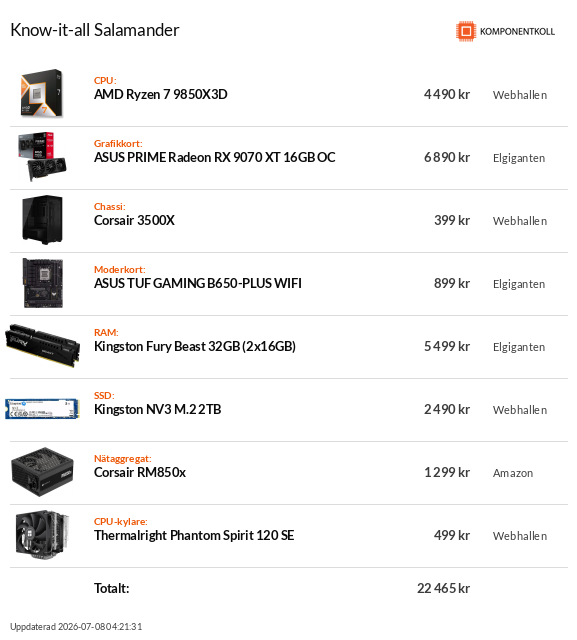
Or you can go cheaper with AMD build:

8z22JLZpXn7W6zJ5.png


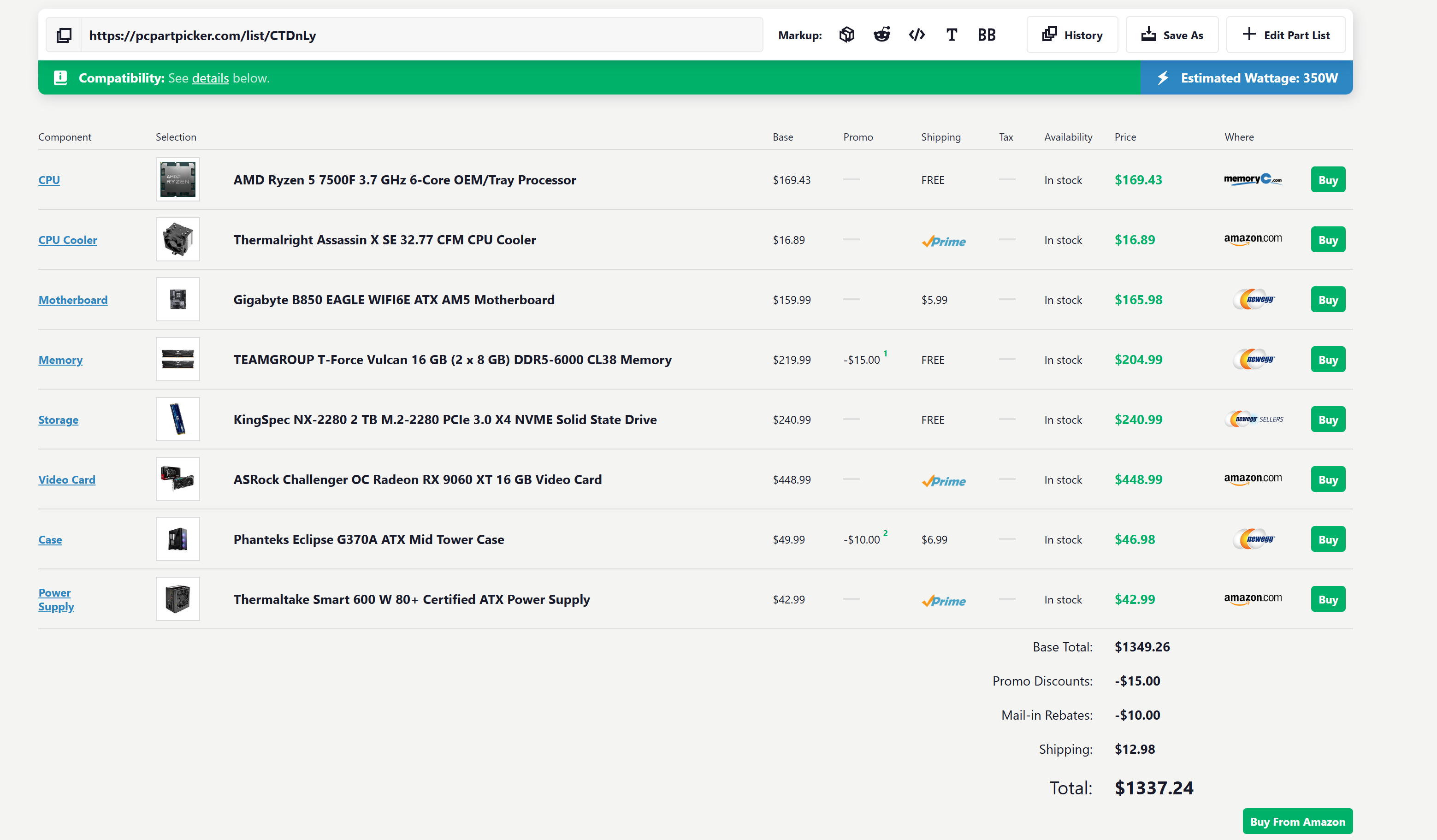
9070XT:

KasbA4zAYn9Tnyru.png


Maybe 1TB is enough? Another -100$.
It's what i have now and it is a beast (well for me at least). I have the 7600x+RTX5070
 
Fuck water cooling btw. You'll never have something more reliable than a big block of radiator + quiet fans. I've seen too many AIO fails to ever risk my rig with that shit. Water cooling is interesting in really really small SFF cases where nothing else fits, you're basically putting that in a giant case for almost no thermal gains but all the risks.
I've never heard of anyone having their Aio breaking, except for ones that are very, very old. But yeah, a air cooler is the safest bet I guess. I haven't had air coolers for many years, but how are they noise-wise compared to good aios these days?
 
You will use one or another, not both.

No one is saying it's comparable to console experience (and gladly it's not as console navigation with dpad sucks, thank God Switch has touch screen to help). It's about navigating Windows interface the way you prefer.
Exactly. The problem is, you have to choose and configure. By default both activate
 
I've never heard of anyone having their Aio breaking, except for ones that are very, very old. But yeah, a air cooler is the safest bet I guess. I haven't had air coolers for many years, but how are they noise-wise compared to good aios these days?

To me, I've seen too many failures throughout the years and recalls that I don't trust.

Even recalls, Lian Li, Enemax, MSI, Corsair, Arctic Liquid free maintenance kit, etc.

Peoples cool a lot of AMD CPUs in SFF with a mere NH-L12S (including me for a 5800X3D) with very low noise, so a big tower with a bigger radiator makes it a non issue noise wise. Don't forget that your GPU will likely always dominate noise comparatively unless you also thermal cool it and that's typically a whole new headache with a custom loop and expensive GPU water cooler solutions. The contribution of CPU air cooling will be typically lower than GPU's and on a logarithmic scale to combine them for total sound power, it's a non factor unless you picked a weak CPU cooler.

It won't beat AIO thermally (the expensive ones, the cheap ones are typically beaten), but for even normalized dB(A) sound between all of them, your air cooler will be ~3-4°C more? Nobody should care about that when temps of these big coolers are in the ~50-55 range.

~5 years lifespan expected, by then you have extreme permeation of the tubes with the liquid and you have to replace the loop, refill it or replace the cooler. If it did not fail before. The higher end fans (Noctua and comparables) comparatively, have like average 150,000 hours lifespan? That's like nearly 2 decades of continuous operation (who does that)

AIOs are generally more expensive and the temperature advantage, in most cases, is purely trivial.

For someone entering PC for the first time, I would pick the "don't think about it" & "no risk" solution 100%
 
What do folks think is the best gpu, bang for your buck, for 4k gaming? 5070 ti? 1440p.....5060 ti?
I'm hearing 9070XT is the best value, which right now costs around $700 new but will last a while. I wouldn't say it's the best for 4k gaming though (even if it can do it for many games), the 5080 is a better bet. But the 5080 also cost twice as much. The 5070ti is another option but is $200 more than the 9070XT. It's barely better and not worth that price difference imo. It's a similar story for 1440p.

The 5060ti is about $150 cheaper, but not nearly as good as the 9070XT. I wouldn't at that price- the 9060XT is almost $200 cheaper than the 5060ti and there's barely any difference.

(These are microcenter prices, approximate)

9070XT= $700
5070ti= $900
5060ti= $530
9060XT= $350
5080= $1,400

Also wouldn't hurt to get these used somewhere to save around $40 - $100 more or so.


Last edited:
If I were building today and wanted to go cheap, I'd buy used generic SSD and ram from ebay from a reputable seller. I'd go DDR4 instead of DDR5. 5700x or 5800x3D. At higher rez gaming, that's fine.

What do folks think is the best gpu, bang for your buck, for 4k gaming? 5070 ti? 1440p.....5060 ti?
24GB DDR5 need minimum.

The rtx5070 enough, 1080p + DLSS4.5 = 4K output experience with ultra settings and good RT.

Everything runs at a stable 60FPS or 120 with framegeneration.
 
Last edited:
24GB DDR5 need minimum

The rtx5070 enough, 1080p + DLSS4.5 = 4K output experience with ultra settings and good RT.

Everything run stable 60FPS or 120 with framegeneration.

What game requires 24GB much less DDR5? Why are you going to say 24GB ram and then opt for the 12GB GPU?
 
"You can solve this by doing all this extra stuff"

That's exactly the friction I'm talking about.

Also steam big picture mode and Xbox full screen experience by default both react to the controller menu button, so you press it once, and both interfaces activate at the same time, conflicting with each other. It's really messy.

All of this is solvable, but it takes a lot of fiddling and configuration to get it to, at best, approximate a console like experience.

You're misleading people by understating these barriers, pc gaming on Windows 11 is not comparable to the console experience, especially for new users expecting to plug and play.
Eh, I think that it's misleading to act like these barriers are vast, and it just doesn't take much fiddling anymore.

Either disable the game bar in its general settings, or uninstall it once. The rest of the common issues with a gamepad on the couch are games that have launchers/confirmation windows that needs a mouse cursor, needing to type in fields with a keyboard, or doing common key commands like alt-tab.

You can solve all of these btw on any gamepad with one toggle of the "Enable Guide Button Chords for controllers" button in Steam Controller settings. Where the Guide=xbox/playstation/center button. So holding down the guide button lets you do right stick to move the mouse, bumpers to left/right click, left stick up/down to adjust system volume, left stick left/right to skip background media tracks like Spotify, left stick press to play/pause background media, guide + start alt-tabs, and guide + select/back to bring up the on-screen keyboard like the Steam Deck. All of this behavior defaults with one toggle.

The barriers have gotten more minor with each passing gen, and the Steam Controller makes it even easier with the trackpads + it's center button doesn't conflict with game bar on at all in Windows. I just don't think the fiddling is that extensive anymore, moreso that people might not know about that toggle, and just sometimes a game won't work on a person's variable hardware.
 
Last edited:
I've never heard of anyone having their Aio breaking, except for ones that are very, very old. But yeah, a air cooler is the safest bet I guess. I haven't had air coolers for many years, but how are they noise-wise compared to good aios these days?
Mine broke. Some sort of mineral or something formed around the connector to the CPU (inside the pipe) and prevented heat transferrence.

I only realized when I started getting unexpected crashes, so I checked my temps and my CPU may as well have been operating on the surface of the sun, lol.

That was the middle of last year, and the model was produced after 2020, I'm pretty sure.
 
What game requires 24GB much less DDR5? Why are you going to say 24GB ram and then opt for the 12GB GPU?
In my experience, most games use between 14 - 18GB of DRAM with the settings I mentioned, which is why I recommend 24GB.
A graphics card with 12GB of VRAM is sufficient for current games, as they typically use between 8 - 10GB, especially in XBOX Mode, which reduces RAM usage.

With this combination, you get a next-gen experience comparable to current consoles at a relatively reasonable price.
 
Top Bottom