
• Hey Guest. Check out your NeoGAF Wrapped 2025 results here!

SFF build under the TV

I play quit a lot using Moonlight streaming (previously used official Steam Link, but this feels better now) over wired LAN from the PC in my home office to a Pi attached to bedroom TV, with big picture mode... and it's great, no complaints.

This sounds very interesting. Is there an up-to-date tutorial on getting something like this set up?
 
This is mine. The case is a Lian Li mini-ATX A3. Gives you an idea what the size would be for that type of case

B9P9rux2pYP9MMtJ.jpeg


"Mum, grandpa fell asleep playing his game again"
 
You're doing it wrong. You can have Steam auto-start in big screen mode


There was a way to even prioritize Steam boot over *almost* everything else in windows and I would basically not even see the desktop. Not sure nowadays how it is with windows 11 but it was a solution 10 or so years ago on windows 10
 
Last edited:
There was a way to even prioritize Steam boot over *almost* everything else in windows and I would basically not even see the desktop. Not sure nowadays how it is with windows 11 but it was a solution 10 or so years ago on windows 10

Windows is extremely modifiable if you really want to. you can prevent the entire desktop from loading for example if you want.
so you can probably create a setup where most Windows elements don't load at all and it just launches into steam.

just go into the registry and remove the explorer.exe from whatever the registry key is called that loads it on boot. should be somewhere in the winlogon folder.

edit: yeah, I think this could be how you load into steam before anything and don't even load the desktop.
HKEY_LOCAL_MACHINE\SOFTWARE\Microsoft\Windows NT\CurrentVersion\Winlogon
there's a key there that's called Shell... I wonder if you replace explorer.exe with a path to your steam exe, if it boots steam instead, or if you'd have to change a couple of more things to prevent explorer from loading and to make sure Steam is the first thing that loads up
 
Last edited:
This sounds very interesting. Is there an up-to-date tutorial on getting something like this set up?
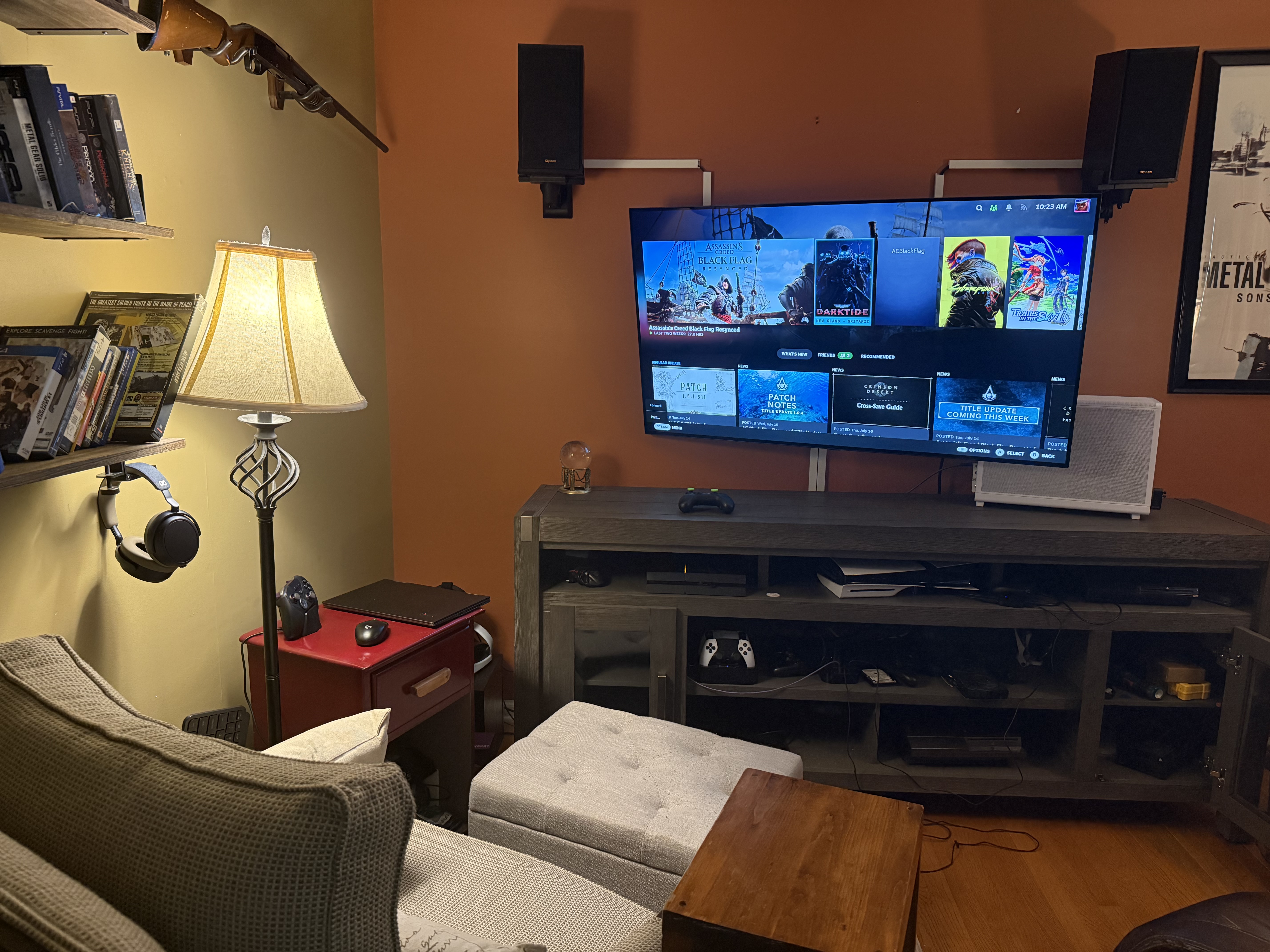
pretty standard setup I think, although it is still streaming (though very fast if you have wired conn on both sides) so some people wouldn't like it if you're playing high speed competitive games that rely on miliseconds etc. It doesn't really matter on the PC genres I play.

official guide for pi4 is here -> https://github.com/moonlight-stream/moonlight-docs/wiki/Installing-Moonlight-Qt-on-Raspberry-Pi-4

But you can surely find easier tutorials elsewhere if you want. In my case, I already had a pi model 4 (5 would be even better, but 4 is enough) sitting around so it was no risk to test it out, and I ended up keeping it this way since it works smoothly.
 
Logitech K400+ is good for living rooms. Has a trackpad instead of mouse. Not too big or too small. 2AA batteries last practically a whole year. Can use a USB extender if necessary but for most rooms the signal is great.

It's crazy how long this has been a relevant piece of hardware. I remember buying and using one of these more than a decade ago.
 
I use my laptop on the TV all the time and it's pretty seamless, especially these day with BP mode and the options they have for mini keyboards with trackpads. This is the one I use. I like that it's backlit.
Mini-Wireless-Keyboard-Remote-Control-Touchpad-Mouse-Combo-Controller-RGB-Backlit-Keypad-Android-TV-Box-Smart-OS-TV-PC-Computer-Laptop-Window-OS-HTPC_ca6fc932-b8ef-45c3-aa55-8a53c767e954.dc0bcadd6294b25237a32fde245291ee.jpeg
 
Last edited:
Windows is extremely modifiable if you really want to. you can prevent the entire desktop from loading for example if you want.
so you can probably create a setup where most Windows elements don't load at all and it just launches into steam.

just go into the registry and remove the explorer.exe from whatever the registry key is called that loads it on boot. should be somewhere in the winlogon folder.

edit: yeah, I think this could be how you load into steam before anything and don't even load the desktop.
HKEY_LOCAL_MACHINE\SOFTWARE\Microsoft\Windows NT\CurrentVersion\Winlogon
there's a key there that's called Shell... I wonder if you replace explorer.exe with a path to your steam exe, if it boots steam instead, or if you'd have to change a couple of more things to prevent explorer from loading and to make sure Steam is the first thing that loads up

Something similar yea. I had to go into regedit for sure.

Like I said previously, I think if I was OP and would dedicate a PC under the TV nowadays, it'd be SteamOS.
 
Something similar yea. I had to go into regedit for sure.

Like I said previously, I think if I was OP and would dedicate a PC under the TV nowadays, it'd be SteamOS.

steamOS or Bazzite are for sure more plug and play, but I wonder why noone has made a program yet to turn Windows into a gaming OS, similar to the declutter windows stuff, but specifically tuned for gaming.
so an easy way to turn off the explorer from loading and turning off everything that is not necessary for steam basically. and of course for booting directly into steam big picture.

you can for sure do it manually in the registry, but it would be nice to have an easy program with simple on/off toggles
 
I have a Lian Li H20. You're going to want to undervolt your GPU. It's a tight fit, and it'll get hot and loud very quickly.
I had the H20 prior to my Fractal Terra and the H20 was so fucking loud it drove me nuts and that was when I was using a 3600/3060ti combo.

I don't think I'll ever use the Xbox Fullscreen mode tbh.
I have my PC connected to my monitor and to my TV using a 7m HDMI cable so it's not practical to use.

instead I use a Dualsense in combination with DS4windows, where I set up a layout and macros that lets me control basically everything without needing a mouse or keyboard.
I have macros to swap screens (TV/Monitor), to open task manager, and ALT+F4 macro, and a macro to turn my touchpad mouse controls on and off.

I generally prefer having full desktop control over using a full screen mode, be it steam or Xbox. I kinda don't trust them to work properly 😅
Xbox Fullscreen just looked ugly as hell to me even if it worked relatively well. I only used it for like 30 minutes and quit because you can't really use Fullscreen in conjunction with BPM.

I had a Fractal Ridge but could never get over how bad the CPU thermals were and how few coolers worked with the height restrictions. A few times I had the system shut itself off due to overheating, and that was after setting a lower thermal limit in BIOS. Played around with undervolts and PBO tuning, with some luck. I switched to an NCase M2 and was able to get a Peerless Assassin 120 Mini and it dropped 9800x3d temps by nearly 15C. RTX 5080 FE as GPU.
I think the main problem is that you had a 9800x3d in the Ridge.

Just download HDR calibration Jesus Christ the way people behave like it's an act of congress is cringe inducing. Hell - many tvs and monitors have hdr profiles built into windows that do it for you.
I find HDR on Windows to just be an annoying ass experience. If you keep HDR on then everything SDR looks like absolute shit but if you turn it off to get normal colors in SDR then you gotta remember to WIN+ALT+B every time you launch a HDR game.

Consoles do HDR way better IMO.
 
Top Bottom