WhamBamThankYouMaam
Member
They could have just made game mode they way it was supposed to be.

Is this still on track for release this month or have I missed something?

Mac and iOS have the advantage that noone expects longterm backwards compatibility.
if you own a new Mac it's basically expected that older programs are incompatible with it, but on Windows it's expected that even stuff made for Windows 3.1 still works.
the sole reason your default Windows install drive letter is C:, and why subsequent SSDs, HDDs and CD/DVD/BD drives get D:, E:, F, etc., is because A: and B: are by default reserved for floppy drives.
if you connect a USB floppy drive to a Windows 11 PC it will get assigned the letter A:. if you connect a second one it's gonna get B:, because many older programs of the Pre-HDD era expect those 2 drive letters to have the data they need.
that's how far Microsoft goes to keep old software compatible, even if you need to tinker a little bit with compatibility modes and stuff.
so Windows is bloated by default in some regards. and that bloat will never be cleaned up

with AutoSR would come to PC
AutoSR would also be interesting as a toggle for backwards compatible games on Series X. it should have enough ML TOPS to run it while running back compat titles, as the majority of the GPU is idling anyway in those games.
I thought XbsX entire system only have the same amount of TOPS as a Geforce 2026 which is not very powerful by today standard. If they can get it to work on PC with Geforce tensor cores or Intel Arc gpu that would be cool. If I were Intel I would be getting involve with MS getting it to run on their mobile NPU right now
I guess it would varies from games to games, some games actually pushes the xbsx quite hard even running at native. I think Gears Judgement is one of them with only 60fps update but still runs at 720pthe Series X GPU has around 100 TOPS, AutoSR needs 40 TOPS afaik.
even if running autoSR occupied 50% of the entire GPU, it would still be more than enough GPU power to run 360 games, which need less than 15% of the GPU to run full speed.
I guess it would varies from games to games, some games actually pushes the xbsx quite hard even running at native. I think Gears Judgement is one of them with only 60fps update but still runs at 720p


You sure about that? 360 wasn't x86 architecture unlike Xbox zone and XSX/XSS.the Series X GPU has around 100 TOPS, AutoSR needs 40 TOPS afaik.
even if running autoSR occupied 50% of the entire GPU, it would still be more than enough GPU power to run 360 games, which need less than 15% of the GPU to run full speed.
You sure about that? 360 wasn't x86 architecture unlike Xbox zone and XSX/XSS.


It's the OS, not the machine. I'll be dual booting if not outright switching.MS getting scared of the steam machine

It's rolling out gradually. If you don't want to wait, you can force it:
Benefits:
- console-like interface (I think it's better than the Xbox Series UI!)
- controller or keyboard+mouse usage, with very responsive switch
- all PC Stores in one place, games collected in a central list
- quick game switching with a single button press, a kind of quick resume
- less RAM and VRAM usage
- games are 10-20% faster compared to the previous normal Windows gaming


Just change the button that brings the BPM up, no?I tried it for like 5 minutes but not being able to use Steam BPM at the same time due to the Xbox button conflicting killed it for me.
Plus 4% performance isn't enough to convince me.

Can the steam home button be mapped to another button? Or the game bar? I want to use both but this kills it for me as wellI tried it for like 5 minutes but not being able to use Steam BPM at the same time due to the Xbox button conflicting killed it for me.
Plus 4% performance isn't enough to convince me.
Edit: I'm a fucking retard and can't read. I'll not edit my "retardism" out.
15% is quite good...


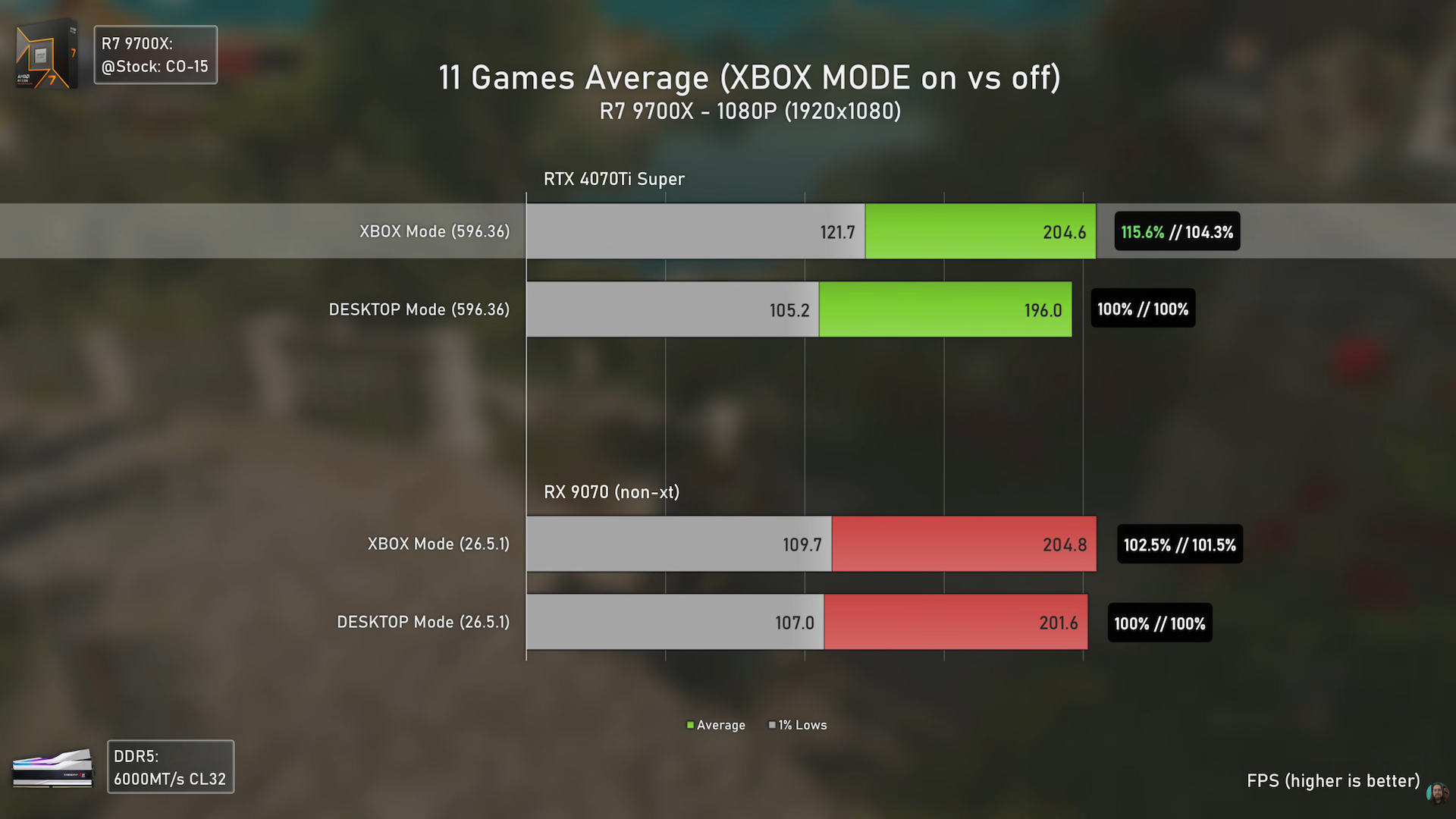
so 15% improvement for Nvidia and 2% for AMD ?
Not bad for Nvidia users at all for just an overlay change.

so 15% improvement for Nvidia and 2% for AMD ?
Not bad for Nvidia users at all for just an overlay change.
Not exactly. 4% improvement to averages and 15% to 15 lows.
Seems like nvidia drivers have some issues with some games, causing bad 1% lows.
Which then also lowers the average. And this Xbox mode fixes it. CS2 is a good example of this.
On AMD it's a lot more consistent, with no game having bad 1%lows.

Are they still doing a less bloated version of Windows 11 soon? I think that's separate from this unless I'm misunderstanding something, which I very well may be, but I wonder if this will be close to the performance we'll see on that, with or without the Xbox mode.so 15% improvement for Nvidia and 2% for AMD ?
Not bad for Nvidia users at all for just an overlay change.

So Xbox Mode is them killing explorer.exe and making the Xbox app full screen . . . totally awesome dude!
- Only one window is displayed at a time.
- Apps are displayed full screen when possible.
- Apps that open multiple windows may show only the most recent window.
- Apps that do not support full screen are shown on a black background.
- Window controls such as minimize and maximize do not change window state.
- Some desktop keyboard shortcuts are disabled.
Turn on Enter Xbox mode on startup to start Xbox mode automatically after you sign in.
- When this setting is on, Windows limits background processes to improve performance while gaming.


On AMD it's a lot more consistent, with no game having bad 1%lows.

Even peak 15% won't make any difference for anyone.From what I saw on those graphs, the improvements were smaller as the resolution increased. I run 4k native on my 9070 XT, so I'm guessing this wouldn't make much difference for me?
Be glad, there are still games that need that mouse.I'm trying it now.
WHY do I see the mouse cursor even though I use the controller???
I can't see the battery percent on my Xbox mode anywhere. I've got it turned on but not to be found anywhere, not even a basic battery icon.
Also, at no point does it ask me to restart the PC when switching modes. I remember seeing older vids of people getting an option to switch right away or reboot with clean resources.
The Gamebar onscreen stuff wont stick (No pin option) So no gamebar performance metrics, No achievment popup even though I notifications and away modes set (I think I have em set right).
but I can still see Nvidia overlay and Steam overlay.
I've done my own little benchy marks and I see zero difference in performance.
I'm starting to suspect I got a fake Xbox mode and Microsoft is trolling me.

The pointer should only show when you move it, as soon as you use the controller the mouse pointer should disappear.Be glad, there are still games that need that mouse.
The pointer should only show when you move it, as soon as you use the controller the mouse pointer should disappear.
Your supposed to gently let me down that I wasted all that time the past couple of days.You have indeed gotten a different Xbox Mode. The one the saves RAM is only present on gaming handhelds as of now.
The Xbox Mode on desktop only makes changes to the GUI, and switching is instant with Win + F11.

Not true. On desktop too. I tested it.The one the saves RAM is only present on gaming handhelds as of now.
Not sure about Xbox mode but this here seems to be working
Not sure about Xbox mode but this here seems to be working


Sounds impressive until you look at the actual benchmarks and realize that Counter Strike is doing the heavy lifting for those averages. Most of the games show no difference past 1080p. It is very easy to use, although it doesn't work with my Dualsense and I have to use the keyboard to navigate anyway. You can hit the Windows key to switch back to the desktop so that's ok, I guess.
Overall, if feels less like a general PC gaming improvement and more like a preview of the next Xbox console/PC.


 tips2fix.com