

-
Hey Guest. Check out your NeoGAF Wrapped 2025 results here!
You are using an out of date browser. It may not display this or other websites correctly.
You should upgrade or use an alternative browser.
You should upgrade or use an alternative browser.
[Verge] Microsoft’s Xbox mode is now available for all Windows 11 PCs
- Thread starter Topher
- Start date




Topher
Identifies as young
Literally every OS has some form of telemetry.
That's not true. There are varieties of Linux that have no telemetry at all. Same for FreeBSD and OpenBSD. Among the operating systems that do send data, Windows is notorious for being extremely bad.
Tobimacoss
Member
I just had a hunch I would be quoted.... By you.

I bring forth evidence.
Microsoft confirmed a while back that it's just one device.
Edit: Which makes sense as we've only ever heard about one.
Sorry, edited it in above.
So Project Scarlett was revealed in June 2019 and the existence of Series S was not leaked until September 2020, 6-7 weeks before Series Consoles launch in November 2020.
MS has reiterated multiple times that they are building an entire portfolio of devices...


Also, both
 HeisenbergFX4
and
K
KeplerL2
have stated that they're doing both Xbox PCs and Xbox Consoles.
HeisenbergFX4
and
K
KeplerL2
have stated that they're doing both Xbox PCs and Xbox Consoles.
bitbydeath
Member
Unless plans have changed. It was already confirmed by Sarah Bond that Helix will use full windows.You sure about that? I don't even think MS are 100% sure what they are going to do. I'm guessing it will be an Xbox like OS with sandboxed PC game access, I don't think it is just going to be a PC with windows bigacreen.

Next Xbox console will be a full Windows gaming PC, report says
This confirms some of Mashable's own reporting on the next-gen Xbox console.
 mashable.com
GDC confirmed Helix games will be no different to PC games.
And in their talk about Helix it mentions Xbox mode specifically as a step for making a consistent experience across screens.
As games increasingly span devices, we're breaking down the barriers between console and PC games for more seamless cross-device play, and we're making the Xbox experience consistent across screens.

From GDC: Building the Next Generation of Xbox - XBOX Wire
Xbox is deep in development on the next generation Xbox console, Project Helix. Find out more from our keynote at the 2026 Game Developer Conference.
 news.xbox.com
WhamBamThankYouMaam
Member
Ok.
* Once more windows game mode that they have tried since 2017.
* A steam full screen xbox version
* Another attempt at making people care about ms store (that makes what…4 relaunches?)
* A gog style launcher
* Some under the hood changes that should be there regardless.
In other words a thinly veiled attempt at making people buy stuff via ms storefronts.
* Once more windows game mode that they have tried since 2017.
* A steam full screen xbox version
* Another attempt at making people care about ms store (that makes what…4 relaunches?)
* A gog style launcher
* Some under the hood changes that should be there regardless.
In other words a thinly veiled attempt at making people buy stuff via ms storefronts.
Topher
Identifies as young
I just had a hunch I would be quoted.... By you.
I bring forth evidence.
That's fine, but you shouldn't be calling out anyone for speaking "in such absolutes without any proof." That describes most of your posts.

adamsapple
Or is it just one of Phil's balls in my throat?
Ok.
* Once more windows game mode that they have tried since 2017.
* A steam full screen xbox version
* Another attempt at making people care about ms store (that makes what…4 relaunches?)
* A gog style launcher
* Some under the hood changes that should be there regardless.
In other words a thinly veiled attempt at making people buy stuff via ms storefronts.
What does this have to do with the ms storefront? Your steam and other launcher games will also benefit.
I swear most of the criticism in this thread is just interchangeable with cluelessness


HeisenbergFX4
Gold Member
Personally, I would no longer bet my house on what Xbox is doing with the leadership shakeupI just had a hunch I would be quoted.... By you.
I bring forth evidence.
Microsoft confirmed a while back that it's just one device.
Edit: Which makes sense as we've only ever heard about one.
Sorry, edited it in above.
So Project Scarlett was revealed in June 2019 and the existence of Series S was not leaked until September 2020, 6-7 weeks before Series Consoles launch in November 2020.
MS has reiterated multiple times that they are building an entire portfolio of devices...
Also, both
I still feel very confident Xbox is doing the first party Xbox console that will have BC and 3rd party vendors using the same Magnus chip will be doing Xbox PCs without the BC
Now does the "console" run Steam and other storefronts still?
Honestly no idea
If it does run Steam but runs games like MLB The Show that is only on console does that make it a PC or a console?
Again no idea
Is Xbox trying to call it a console to avoid license agreement lawsuits?


DarkLordOtaku
Member
I still think Microsoft selling OEM PCs makes more sense than walled garden consoles. I'm still not going to buy one, but I think it's a better path forward for them at the least.
lastmessiah
Member
What the hell do you guys do with your PCs that you have these problems? All I ever see on the internet is "GRRRR WINDOWS" and I scratch my head because everything here just works and doesn't interfere unless you go out of your way to break it.Oh and how many times do I have to click "show less of this" to the "turn your Xbox power features to save the earth mode" ad on my Xbox dashboard?
And fuck PS5 too. And I'm sorry but I've had the same issue on steam deck where certain games like Dirt 5 and street fighter regularly say it's my first time playing so I've to go online when I just want to play what I've paid for.
There's a growing hole in the market for companies that sell network free tech. When I buy white goods these days it's back to basics so I'm putting my money where my mouth is too.

rodrigolfp
Haptic Gamepads 4 Life
GitHub - 8bit2qubit/XboxFullScreenExperienceTool: A one-click GUI tool to safely enable the hidden Xbox full screen gaming experience on Windows 11.
A one-click GUI tool to safely enable the hidden Xbox full screen gaming experience on Windows 11. - 8bit2qubit/XboxFullScreenExperienceTool
 github.com


Bojji
Member

GitHub - 8bit2qubit/XboxFullScreenExperienceTool: A one-click GUI tool to safely enable the hidden Xbox full screen gaming experience on Windows 11.
A one-click GUI tool to safely enable the hidden Xbox full screen gaming experience on Windows 11. - 8bit2qubit/XboxFullScreenExperienceTool
So what does it do exactly? This whole Xbox mode?
Last edited:
Can you use Playnite with this Xbox mode. Currently, I launch into Playnite and access all my games from the different stores in one place. I can snooze my PC and resume, all with my controller. Can I still do this with this new mode or is it going to limit what app I can launch into?
Bojji
Member
So glad i use Windows 10

But you don't have Xbox mode!

I don't have it on W11 LTSC as well...

Lokaum D+
Gold Member
I have steam big pictureBut you don't have Xbox mode!
I don't have it on W11 LTSC as well...

Last edited:
rodrigolfp
Haptic Gamepads 4 Life
Almost the same Xbox app UI but option to navigate with controller. A "Big Picture Mode" as expected.So what does it do exactly? This whole Xbox mode?


PauloRoberto
Member
W8, you really thought about betting your house using xbox management decisions ??!?!?! (im kidding, of course).Personally, I would no longer bet my house on what Xbox is doing with the leadership shakeup
I still feel very confident Xbox is doing the first party Xbox console that will have BC and 3rd party vendors using the same Magnus chip will be doing Xbox PCs without the BC
Now does the "console" run Steam and other storefronts still?
Honestly no idea
If it does run Steam but runs games like MLB The Show that is only on console does that make it a PC or a console?
Again no idea
Is Xbox trying to call it a console to avoid license agreement lawsuits?
bitbydeath
Member
He's got others.W8, you really thought about betting your house using xbox management decisions ??!?!?! (im kidding, of course).


ReasonBeing
Member
When I tested Xbox mode a month or so ago, you had to restart into the "full screen experience" for any performance benefit.Imma be honest, been playing my regular games for awhile now and noticed no difference. Xbox mode was already on, I just checked 2 mins ago
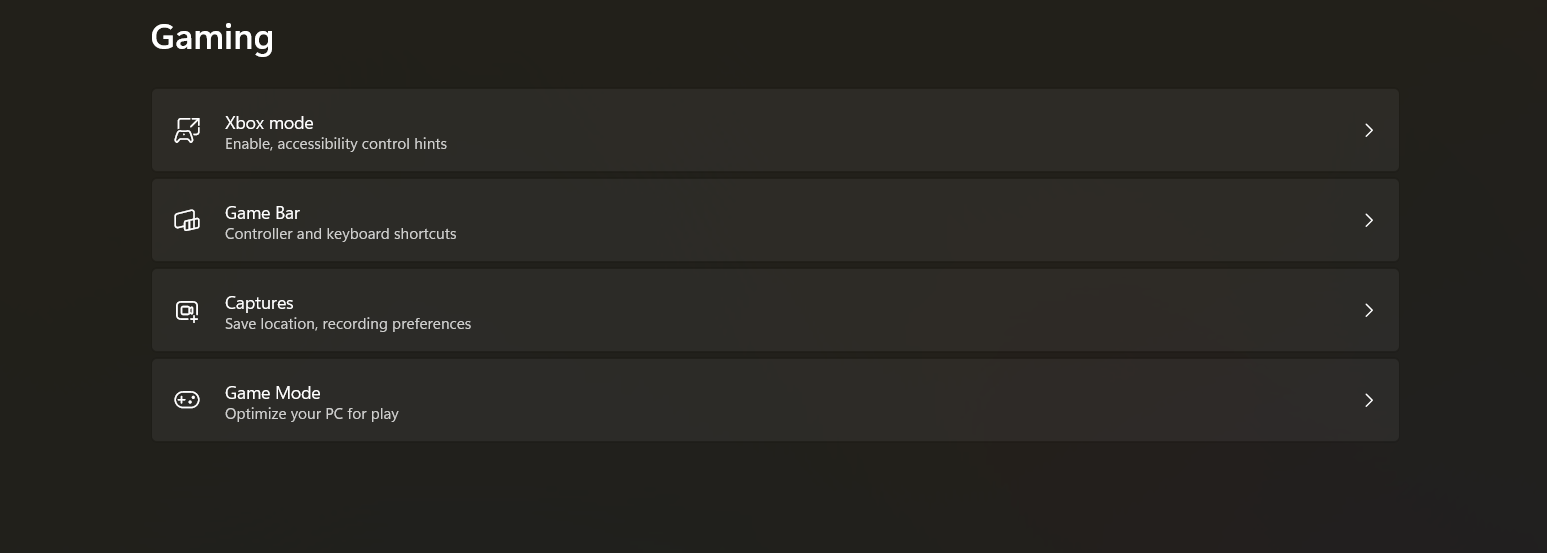
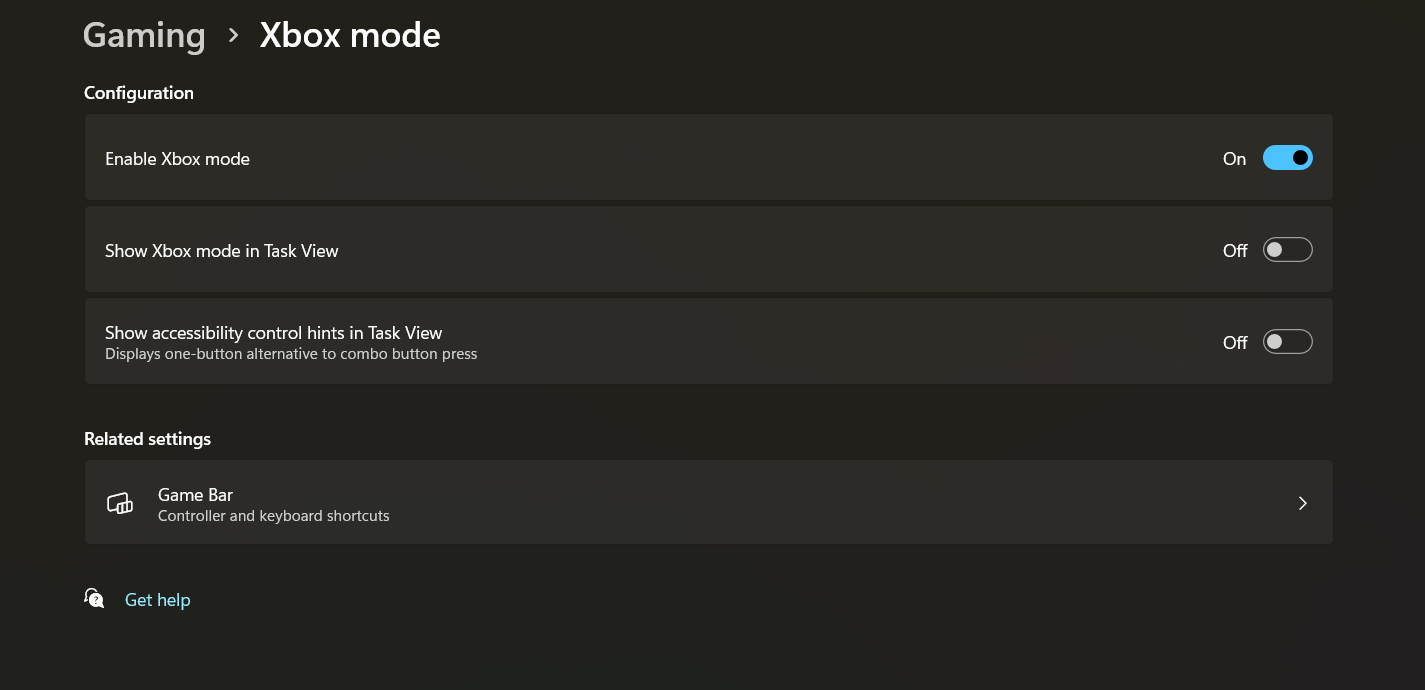
It's Big Screen UI with less background tasks. The benefit isn't very large depending on your set up, but there.
Edit: just for clarity, You can launch "full screen experience" without restarting, but that just allows you to play with the new UI, It does not reduce the background load when you jump in this way. The only benefit going this route is being able to navigate it solely with the controller.
Last edited:

Tajaz2426
Psychology PhD from Wikipedia University
Mine looks the same, is there any way to bring it up, like Steam or Nvidia? I'm not really sure what this is doing? Is it just automatic?Imma be honest, been playing my regular games for awhile now and noticed no difference. Xbox mode was already on, I just checked 2 mins ago

Audible Silence
Member
ummm so what is the benefit to a filthy casual who plays at a desk? asking for a friend....
WhamBamThankYouMaam
Member
From microsofts perspective it has everything to do with their storefronts (regardless if it is the game store or app store). The end goal for ms is not to have an "xbox os" where you buy steam games.What does this have to do with the ms storefront? Your steam and other launcher games will also benefit.
I swear most of the criticism in this thread is just interchangeable with cluelessness
adamsapple
Or is it just one of Phil's balls in my throat?
From microsofts perspective it has everything to do with their storefronts (regardless if it is the game store or app store). The end goal for ms is not to have an "xbox os" where you buy steam games.
Again, this Xbox Mode UI/service update benefits games from all storefronts, not just the MS/Win store ones so I'm not sure where this tangent is going.

Thesnipergecko
Member
I didn't even know what I was looking for until I saw this post. I don't have it yet.Imma be honest, been playing my regular games for awhile now and noticed no difference. Xbox mode was already on, I just checked 2 mins ago

WhamBamThankYouMaam
Member
Of course not. If they could somehow supercharge your gaming via gamemode they would have put it i to gamemode already.People expected this to be more than Big Picture Mode with maybe some "game mode" switches to help lower Windows overheads?
This is for you to fantasize about having a pc with an xbox ui xonnected to your monitor and also to your tv. And xbox, what a novel idea. I wonder why no one rhought of that.
Oh, and while you are at it, would you like some gamepass, buy some subscriptions via us and perhaps buy games in our store?

TrebleShot
Member
Isn't this just the FSE We've all been spoofing for months now.
RoboFu
One of the green rats
People expected this to be more than Big Picture Mode with maybe some "game mode" switches to help lower Windows overheads?
Supposedly it stops the dreaded windows pop ups as well as stopping some background services.

poppabk
Cheeks Spread for Digital Only Future
Does it stop the Doom the Dark Ages pop-up? I know there is a simple workaround but how/why did they ever think that was a good idea?Supposedly it stops the dreaded windows pop ups as well as stopping some background services.

StereoVsn
Gold Member
Can you access Steam storefront in "Xbox Mode" or does it just pull installed Steam games?Again, this Xbox Mode UI/service update benefits games from all storefronts, not just the MS/Win store ones so I'm not sure where this tangent is going.
Running Win11 LTSC so don't have this.

Magic Carpet
Gold Member
Pulled out my ROG Ally X last night and spent what seemed like 30 min updating stuff.
This is by far the biggest issue with this Mode. 3rd party software like the Armory crate/controller software are awkward to the point that it's better to use desktop mode.
Also Xbox keeps pausing the updates. I have to manually restart/unpause updates for the xbox app. I don't know if that's because the app is currently running or what.
Either way it's no where near as seamless as a console simply applying a system update.
This is by far the biggest issue with this Mode. 3rd party software like the Armory crate/controller software are awkward to the point that it's better to use desktop mode.
Also Xbox keeps pausing the updates. I have to manually restart/unpause updates for the xbox app. I don't know if that's because the app is currently running or what.
Either way it's no where near as seamless as a console simply applying a system update.
If it's like the ROG Ally X, you can access the Steam Storefront, but also launch into Steams Big Picture mode.Can you access Steam storefront in "Xbox Mode" or does it just pull installed Steam games?
Running Win11 LTSC so don't have this.
Last edited:
Tajaz2426
Psychology PhD from Wikipedia University
Can we do a retard explainer of how this works, Adam? Like a bullet point break down for those of us in that back that may be listening to the lecture, or not.Again, this Xbox Mode UI/service update benefits games from all storefronts, not just the MS/Win store ones so I'm not sure where this tangent is going.
I have it in settings and it's turned on, but I'm not sure I'm understanding its exact purpose. It an overlay or does it just automatically happen in the background. Thank you in advance for any info.
Also, I misspelled retard on my PC and it gave no option to correct it with the actual word. I knew the Mandella effect was real and that damn cornucopia was with that fruit.
Magic Carpet
Gold Member
I think of it as Windows running in that old 'Safe Mode'.Can we do a retard explainer of how this works, Adam? Like a bullet point break down for those of us in that back that may be listening to the lecture, or not.
I have it in settings and it's turned on, but I'm not sure I'm understanding its exact purpose. It an overlay or does it just automatically happen in the background. Thank you in advance for any info.
Also, I misspelled retard on my PC and it gave no option to correct it with the actual word. I knew the Mandella effect was real and that damn cornucopia was with that fruit.
It's Windows. It does everything that Windows does. It's just that Safe Mode loads a bare minimum of stuff. It's missing drivers and stuff running in the background.
People used to use Safe Mode to troubleshoot things. Now Microsoft is using it to run games.

Doctor Hades
Member
I tried this on my PC last weekend and it was as underwhelming as expected.
The app basically forces fullscreen mode for everything so if you open settings from within the Xbox app then it is fullscreen. And because the Settings window is fullscreen rather than a window, there is no way to close it, meaning you have to use Alt-Tab to bring up the apps browser then click the X in the preview window to close it and return to the Xbox app. Not a very user-friendly experience in my opinion. How would that work with a controller? I was frustrated with this using the mouse and keyboard!
Also, the Xbox app itself displays at 1920x1080 on my 2560x1440 display (surrounded by a black border on all sides, basically) with no option to make it use the fullscreen estate. It is very poorly laid out compared with, say, Steam's Big Picture mode which has nicer icons etc.
The biggest issue I have though is that it actually does not close background tasks at all to maximise resources for the Xbox app itself; it just forces a fullscreen app on top of Windows. When you close the app, you instantly return to the desktop with all previous background apps already running. As such, the entire experience is really no different from enabling Game mode from the Settings app and just maximising the previous Xbox app!!!
Very poor showing from Microsoft. It's like they just ported the app from the handheld with little thought for how it would look and run on an actual PC.
The app basically forces fullscreen mode for everything so if you open settings from within the Xbox app then it is fullscreen. And because the Settings window is fullscreen rather than a window, there is no way to close it, meaning you have to use Alt-Tab to bring up the apps browser then click the X in the preview window to close it and return to the Xbox app. Not a very user-friendly experience in my opinion. How would that work with a controller? I was frustrated with this using the mouse and keyboard!
Also, the Xbox app itself displays at 1920x1080 on my 2560x1440 display (surrounded by a black border on all sides, basically) with no option to make it use the fullscreen estate. It is very poorly laid out compared with, say, Steam's Big Picture mode which has nicer icons etc.
The biggest issue I have though is that it actually does not close background tasks at all to maximise resources for the Xbox app itself; it just forces a fullscreen app on top of Windows. When you close the app, you instantly return to the desktop with all previous background apps already running. As such, the entire experience is really no different from enabling Game mode from the Settings app and just maximising the previous Xbox app!!!
Very poor showing from Microsoft. It's like they just ported the app from the handheld with little thought for how it would look and run on an actual PC.
Last edited:
adamsapple
Or is it just one of Phil's balls in my throat?
Can we do a retard explainer of how this works, Adam? Like a bullet point break down for those of us in that back that may be listening to the lecture, or not.
I have it in settings and it's turned on, but I'm not sure I'm understanding its exact purpose. It an overlay or does it just automatically happen in the background. Thank you in advance for any info.
Also, I misspelled retard on my PC and it gave no option to correct it with the actual word. I knew the Mandella effect was real and that damn cornucopia was with that fruit.
Basically what
 Magic Carpet
said.
Magic Carpet
said.The intent is to disable services that aren't needed for games, free up resources etc so games have less windows bloat to share resources with when this 'mode' is active.

//DEVIL//
Member
Imma be honest, been playing my regular games for awhile now and noticed no difference. Xbox mode was already on, I just checked 2 mins ago

Sure fattie.... I trust you ..
Kidding.. I think.. I am honestly not expecting much difference either. But I suppose it's gonna be nice to boot your PC to fill screen experience. Especially if you have a small like PC or something connecting to the tv .
Not sure what is really the big difference between that and steam big picture mode.
Unless there is a quick resume option like steam OS, it's not gonna be as good, and if steam OS doesn't get anti cheat shit working for games like cod, it won't be good as windows .
Doctor Hades
Member
So is this only for playing games on Game Pass and the games you bought from Microsoft?
They burned me on Zune 100 years ago and I'll never buy a digital product from them again lol
I guess my question is: who is this for?
No, the Xbox app displays my entire games library across Steam, EA, Ubi Connect, Battle.net, Epic Games and Rockstar Games Launchers. I don't have GamePass (I cancelled mine in May 2024) and only buy Xbox games on Steam as I have had lots of broken installs when using the Xbox app previously.
My only reason for trying the Xbox app was to test if it actually worked like a console; offering a fullscreen minimalistic interface using a controller that freed up background resources and allowed me to just play games. The idea was that I would boot into this and only exit to Windows if I needed to do something else. Sadly, the current experience does not seem to work like that, at least it doesn't on my system. And, yes, the Xbox App has the Xbox Mode button and the Xbox Mode option is also in Settings > Gaming. I am on the release preview of Windows 11 25H2 Build 26100.8313 or something like that.

DarkShadowXI
Gold Member
I wanna use my PC like a console, as well, and nothing seems to offer that experience without tinkering and time spent setting things up.No, the Xbox app displays my entire games library across Steam, EA, Ubi Connect, Battle.net, Epic Games and Rockstar Games Launchers. I don't have GamePass (I cancelled mine in May 2024) and only buy Xbox games on Steam as I have had lots of broken installs when using the Xbox app previously.
My only reason for trying the Xbox app was to test if it actually worked like a console; offering a fullscreen minimalistic interface using a controller that freed up background resources and allowed me to just play games. The idea was that I would boot into this and only exit to Windows if I needed to do something else. Sadly, the current experience does not seem to work like that, at least it doesn't on my system. And, yes, the Xbox App has the Xbox Mode button and the Xbox Mode option is also in Settings > Gaming. I am on the release preview of Windows 11 25H2 Build 26100.8313 or something like that.
I want a plug and play experience


Fess
Member
I don't get it, I updated everything and it looks the same. All the Xbox, home, etc, icons are still on the left, aren't they supposed to be at the top? And I have a compact mode switch in settings, shouldn't it say Xbox Mode? And the functionality seems shaky, Starfield (Steam) started in the back so I had to alt+tab to see the game instead of Xbox App.
I'm using the Insider version, should I drop out of insider and use the standard version?

I'm using the Insider version, should I drop out of insider and use the standard version?
Last edited:

LavitzSlambert
Member
It's super frustrating. I want to test it out and see what it's all about but they're so random with who actually gets these features and in what order. You'd think ALL insiders would've gotten it before pushing it out to everyone, but here we are.
They couldn't even push out the PC Game Pass new titles to everyone back when I subbed to it. Microsoft's rollouts and testing are complete trash.

MidgarBlowedUp
Member
Hey guys i just tried it out on my pc and it crashed and now there's a red light that keeps flashing.
DntMesArnd
Member
What would be a path forward they could take that would result in you buying their new product?I still think Microsoft selling OEM PCs makes more sense than walled garden consoles. I'm still not going to buy one, but I think it's a better path forward for them at the least.

CrustyBritches
Gold Member
This was what I expected they were doing along with offramping the remainder of their fanbase onto a Xbox PC cetric HTPC with BC. Now I'm kind of tripping about the idea that they aren't releasing a PC at all, and this is just an expensive console that gets automatic ports from GP PC and Xbox App games. That would be wild.Now does the "console" run Steam and other storefronts still?
Is Xbox trying to call it a console to avoid license agreement lawsuits?