
-
Hey Guest. Check out your NeoGAF Wrapped 2025 results here!
You are using an out of date browser. It may not display this or other websites correctly.
You should upgrade or use an alternative browser.
You should upgrade or use an alternative browser.
Xbox mode Rollin out on Windows 11 insider preview
- Thread starter OverHeat
- Start date


seb85
Member
It saves you 0.5gb VRAMI guess changing the name from Full Screen Experience to Xbox Mode has brought a few onboard. Xbox = Winning!!!
For anyone using it, has it improved a lot since launch?

twilo99
Member
The Xbox app was already on PC and it plays the same games. You may be able to launch the game with a controller instead of a mouse now. After launching Xbox Mode with a mouse, of course.
Game changer, I guess.
You can control the Xbox app with a controller now.. similar to the cloud interface

BlackTron
Member
It saves you 0.5gb VRAM
This is actually notable in a VRAM strapped world. Not game-changing but pretty good improvement for a software update (that works by removing stuff we could have been without day one, but better late than never).

 . See if there is any benefit to just having steam big picture mode boot at launch
MrAlwaysRight
Member
This is so on brand for Microsoft, one of the worst things about Xbox is the Xbox UI, so Microsoft say 'let's make Windows Gaming experience like the Xbox UI'

DenchDeckard
Moderated wildly
This is so on brand for Microsoft, one of the worst things about Xbox is the Xbox UI, so Microsoft say 'let's make Windows Gaming experience like the Xbox UI'
There is nothing wrong with the Xbox UI. Unless you think it's the same UI from the Xbox one generation?
It's now pretty much the same as the playstation UI.
MrAlwaysRight
Member
There is nothing wrong with the Xbox UI. Unless you think it's the same UI from the Xbox one generation?
It's now pretty much the same as the playstation UI.
There's so much wrong with it, one being that yes it's the same since the Xbox One, 2 being that it's too many clicks and scrolls to do anything, the Xbox App is the same, the mini guide on pressing the Xbox button is good, but they needed to focus more on a simple frontpage, not smother it in ads and menus hidden behind other menus

Topher
Identifies as young
There's so much wrong with it, one being that yes it's the same since the Xbox One, 2 being that it's too many clicks and scrolls to do anything, the Xbox App is the same, the mini guide on pressing the Xbox button is good, but they needed to focus more on a simple frontpage, not smother it in ads and menus hidden behind other menus
Have to agree. When I owned Xbox, the thing I hated the most was the UI. Really just a matter of personal preference, but I just did not care for it at all.

SupremeJ
Member
I really like the interface, it's even cleaner and faster than the Series X version!
Performance: Games run 10-20% faster compared to regular Windows mode, meaning games run 10-20% faster compared to Steam. All this while consuming 1-2 GB less RAM and using about 10% less VRAM.
You can play two or three games side by side. Once you've launched the games, you can switch between them with the touch of a button. Faster than the quick resume on the console.
Gamechanger.
Performance: Games run 10-20% faster compared to regular Windows mode, meaning games run 10-20% faster compared to Steam. All this while consuming 1-2 GB less RAM and using about 10% less VRAM.
You can play two or three games side by side. Once you've launched the games, you can switch between them with the touch of a button. Faster than the quick resume on the console.
Gamechanger.
Last edited:
Kenshin775
Member
It feels like an Xbox on the Xbox Ally but you have to toggle on and off some options to make it more console like. MS/Asus should have just changed the default settings on the device to make it easier for people that are used to Xbox. Its obvious they didn't make the default settings exactly console like because they want to maximize screen and battery time for the life of the device since its a handheld. This shouldn't be a problem for future non handheld gaming PC's though.
edit: Also puzzling is there no updates tab or updates sub tab in notifications for the device. This has nothing to do with saving battery power,. MS could easily give us an update tab instead of us having us go to 4 different update sections. Makes no sense.
And someone else mentioned it but other storefronts don't have the ease of use as the Xbox storefront. but I don't think Microsoft cares about that friction. They want people to buy stuff from the Xbox store over Steam and Epic.
edit: Also puzzling is there no updates tab or updates sub tab in notifications for the device. This has nothing to do with saving battery power,. MS could easily give us an update tab instead of us having us go to 4 different update sections. Makes no sense.
And someone else mentioned it but other storefronts don't have the ease of use as the Xbox storefront. but I don't think Microsoft cares about that friction. They want people to buy stuff from the Xbox store over Steam and Epic.
Last edited:

kruis
Exposing the sinister cartel of retailers who allow companies to pay for advertising space.
I tried it already and aesthetically it looks so awful compared to Steam BPM, so I just went back to that. It doesn't really feel like a proper full screen interface at all, just the existing Xbox app in full screen.
I'd only be interested if it brings performance improvements and alternative launchers like Steam's Big Picture can run in that mode. I don't want to run Microsoft's crap "Xbox" launcher.

Fess
Member
And this is why I said Linux gamers are the most annoying in the other thread.
You know it's right

I've used Linux enough to not want to get close to it unless I'm forced to do it. I'm sure it seems simple if you grew up using it as an infant but when you're used to Windows and before that MSDOS it's like learning a new language. Every single little thing I want to do has to go through this translation layer in my head and it just feels annoying and backwards and I usually end up having to google for guides for everything. I'm just not interested or have the patience for any of that. I'm annoyed enough if Microsoft change the start menu in Windows.
Topher
Identifies as young
I really like the interface, it's even cleaner and faster than the Series X version!
Performance: Games run 10-20% faster compared to regular Windows mode, meaning games run 10-20% faster compared to Steam. All this while consuming 1-2 GB less RAM and using about 10% less VRAM.
You can play two or three games side by side. Once you've launched the games, you can switch between them with the touch of a button. Faster than the quick resume on the console.
Gamechanger.
Not sure I'm buying that 10-20% faster claim, but Steam games can be played in this mode as well.

Mr.Phoenix
Member
Come on MS... U had one job.
Anyways I'll give them the benefit of the doubt and say this is still just a beta.
Steam big screen mode is still intimately better than this. And MS surely can't in their right minds believe this thing will thrive if it's not at least as good as steam... Or at the very least feature match it.
Anyways I'll give them the benefit of the doubt and say this is still just a beta.
Steam big screen mode is still intimately better than this. And MS surely can't in their right minds believe this thing will thrive if it's not at least as good as steam... Or at the very least feature match it.
Fess
Member
What are your thoughts on this?
That looks better. Is this just for cloud? It doesn't look like that in my Xbox App fully updated through PC Gaming Insider v 2604.1001.9.0. I still have the house and Xbox icons on the left.
Not pushed out to me yet?
But going by the video it's still highly focused on Microsoft Store and Gamepass users.
What I want from MS at this point is an UI which is equally good no matter what launcher the games are originally coming from. They absolutely need to find a way to pull in game info from games from other launchers.

Guardian Monkey
Member
Never forget, you are still playing Windows games, you will always be playing Windows games. Windows games will always be with you.
Games for Windows – Live


Magic Carpet
Gold Member
Changing the name to 'Xbox Mode' has been the most positive thing I've seen from the Windows team.
The marketing team at MS has been truly incompetent these past 2 decades.
I expect Helix to have an outright dumb name.
How do I force my older 'sacrificial' PC into this new insider preview mode? Windows updates never give me the option.
The marketing team at MS has been truly incompetent these past 2 decades.
I expect Helix to have an outright dumb name.
How do I force my older 'sacrificial' PC into this new insider preview mode? Windows updates never give me the option.
Topher
Identifies as young
Some early test:
Wait....that video is from March 15. Xbox mode was only just announced March 11 and just rolled out to Insiders yesterday.
Magic Carpet
Gold Member
Yea I think it may require reinstallsing the inside hub app or something.Wait....that video is from March 15. Xbox mode was only just announced March 11 and just rolled out to Insiders yesterday.
SupremeJ
Member
The previous Delta build was also faster, I've been testing it for weeks.Wait....that video is from March 15. Xbox mode was only just announced March 11 and just rolled out to Insiders yesterday.
Fess
Member
How do I get it?The previous Delta build was also faster, I've been testing it for weeks.
I'm in the insider hub in the PC Gaming group. version Delta 2604.1001.9.0

adamsapple
Or is it just one of Phil's balls in my throat?
And this is why I said Linux gamers are the most annoying in the other thread.

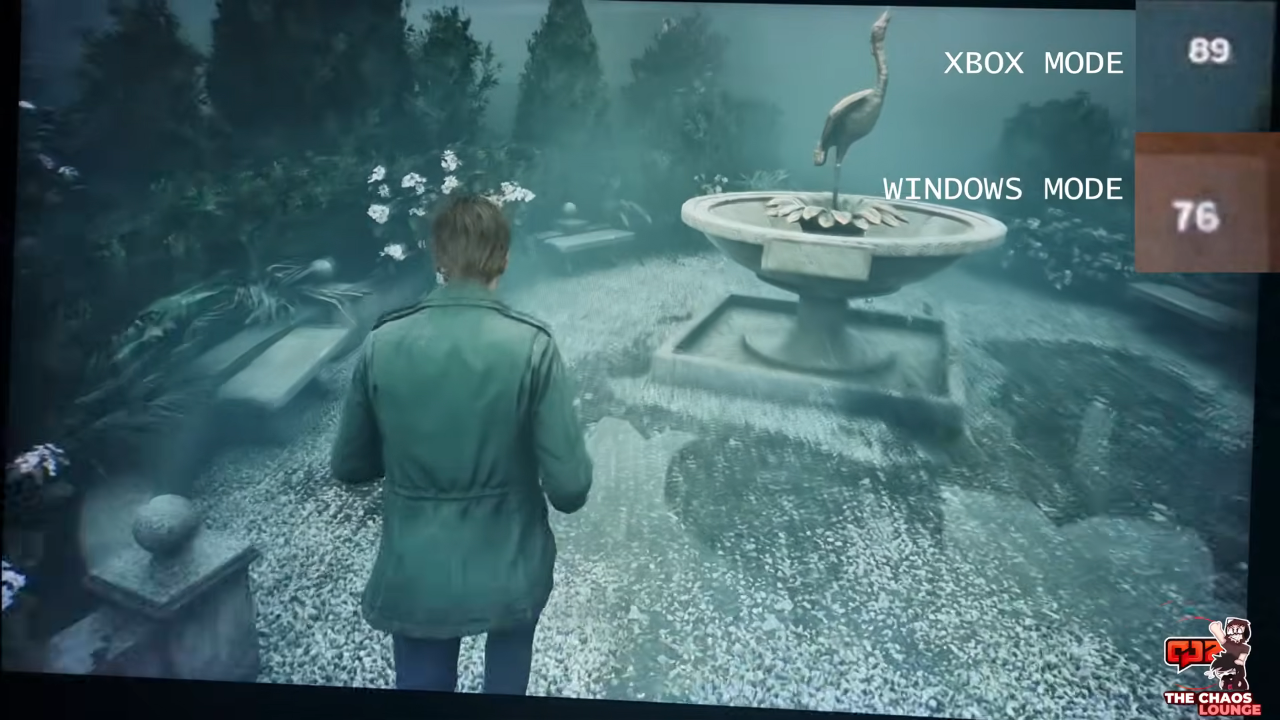
Some early test:
Up to a ~13fps advantage with this UI mode with (assuming) no change in any other setting is a pretty decent uplift.
Last edited:
SupremeJ
Member
Never mind, it's already updated. Test the new version vs normal Windows mode. Post the results. I'll do the same later.How do I get it?
I'm in the insider hub in the PC Gaming group. version Delta 2604.1001.9.0
Last edited:

reinking
Gold Member
I don't think anyone is disputing that. I have been playing Windows games since the transition from DOS in the mid 90's. Before that if you want to count the bundled games. People can be a fan of their games but not a fan of their moves with the OS and console. Personally, I want them to be better. That is why I am curious if Xbox Mode has been a real improvement or if it just FSE with a new name. I believe the echo chamber that they can do no wrong is one of their biggest problems when it comes to Xbox.Never forget, you are still playing Windows games, you will always be playing Windows games. Windows games will always be with you.
It's good to be able to see the Forest through the trees.
That is just it, I think you are deep in the MS/XB forest and can't see beyond it. You saying this to
 Topher
is funny because he has posted about his experiences on multiple devices and operating systems over the years including FSE. What are your recent experiences with PlayStation and Steam? I am a transactional gamer. I will play on any device or OS that offers me the better experience or convenience. Beyond the purchase/rental transaction, I do not owe any of these companies anything else.
Topher
is funny because he has posted about his experiences on multiple devices and operating systems over the years including FSE. What are your recent experiences with PlayStation and Steam? I am a transactional gamer. I will play on any device or OS that offers me the better experience or convenience. Beyond the purchase/rental transaction, I do not owe any of these companies anything else.
Donald mac Ronald
Member
I appreciate the work MS. I was impressed with the game bar when I tried that out after years the other day.
Make it really good and people will use it.
I really don't understand how a company makes that much money and can't make their bread and butter, os actually very good.

Self professed Playstation fan.....

Last edited:
Never forget, you are still playing Windows games, you will always be playing Windows games. Windows games will always be with you.

Fess
Member
What's your version?Never mind, it's already updated. Test the new version vs normal Windows mode. Post the results. I'll do the same later.
SupremeJ
Member
Build 29570.1000What's your version?

8BiTw0LF
Banned
Who gives a rats ass when Proton plays games better than "native" Microslop WindozeRemind me when was last time Linux got a native port? Even MacOS got a native Crimson Desert port.
adamsapple
Or is it just one of Phil's balls in my throat?
Build 29570.1000
Post some other comparisons if you get a chance please, that SH2 comparison is pretty interesting.
Last edited:
Fess
Member
Xbox Game Bar or Xbox App?Build 29570.1000
My Xbox App version is 2604.1001.9.0
Last edited:


Guardian Monkey
Member
Thanks for posting and all the reviews here. Sounds like its still half baked. Ill just wait till retail and see what its like then without having to rollback to get out etc.

S0ULZB0URNE
Member
Can I play my digital Xbox games?
What's the point?
What's the point?
It is the Xbox app (that is a web/http wrapper using Microsoft Edge/webview2 for the Xbox store + basic Xbox library) in fullscreen mode - that opens instead of the desktop after logonCan I play my digital Xbox games?
What's the point?
I actually like the idea of skipping the desktop - but I would rather boot into steam fullscreen directly
Last edited:
WhamBamThankYouMaam
Member
Come on nvidia, fix those linux drivers.

Hero of Spielberg
Member
It's on Canary insider I believeso i installed new windows update from beta / dev. i have even a newer version than the one in the article. but i still dont see windows full experience in settings / games.
what am i missing ?
YesCome on nvidia, fix those linux drivers.
By this point Windows it is not a question on "if" i will drop Windows, it is "when"
Windows is almost beyond saving now.
Microsoft kept Windows somewhat clean from bloatware after a clean install until Windows 10. They have added so much shit these last years - NONE of it good. Telemetry stuff and memory hogging, slow javascript/web tech shit. Even file explorer is slow!
By this point the only thing that could save the OS is a total repackaging with Windows 12 - where all bloatware shit becomes optional add ons. This Xbox mode could be that i guess? but I dont think they can remove all shit - there is so much

//DEVIL//
Member
will give that a try. thank youIt's on Canary insider I believe
//DEVIL//
Member
It's on Canary insider I believe
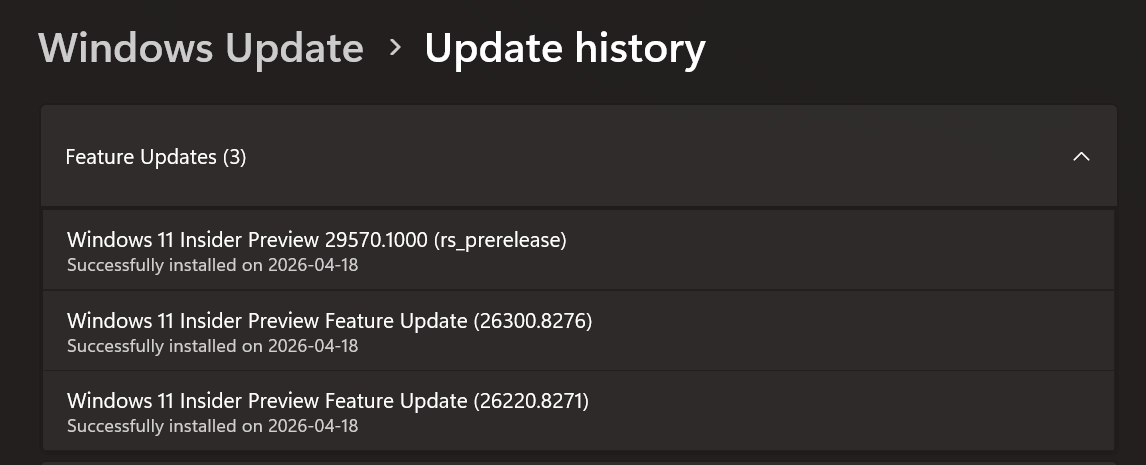
Man i give up with this garbage. I went with Canary, it said there is an update, sure great, took forever, rebooted, i can see full screen experience toggle in the settings. great. but still not working. went to the xbox app, i can click on it, but then it tells me to go to settings, games, and pick the Xbox app as home screen or whatever. But that option isnt available to me in the settings, it was just xbox full screen experience, but nothing in it where I can pick an app.
ok fine, i went to the Windows update again and there was another update ( fucking great :/ ) takes forever, reboots, now the full screen experience is gone again. No more updates. nothing else I can do :/
Leave it to the mentally challenged at MS dev team to fuck things up all the time. what a garbage company man..
Last edited:
Topher
Identifies as young
Man i give up with this garbage. I went with canary, it said there is an update, sure great, took forever, rebooted, i can see full screen experience. great. but not working. went to the xbox app, i can click on it, but then it tells me to go settngs, games, and pick xbox app as home screen or whatever. but that option isnt available to me in the settings, it was just xbox full screen experience but nothing in it where i can pick an app.
ok fine, i went to the windows update again and there was another update ( fucking great :/ ) takes forever, reboots, now the full screen experience is gone again. No more updates. nothing else I can do :/
leave it the the mentally challenged at MS dev team to fuck things up all the time. what a garbage company man..
This is why I skipped the insider version this time. With FSE I had to jump threw all kind of hoops to get it. It's just a jacked up process even though you do exactly what they say you need to do.
Microsoft being Microsoft
Last edited:
//DEVIL//
Member
Same. But i really want to try it. I am in the process of building a mini itx PC and i am this close to install Steam OS to have it under the TV. but i wanted to give this a shot too because if it works, ill use that instead.This is why I skipped the insider version this time. With FSE I had to jump threw all kind of hoops to get it. It's just a jacked up process even though you do exactly what they say you need to do.
Microsoft being Microsoft
Very annoyed by this to be honest lol.
Topher
Identifies as young
Same. But i really want to try it. I am in the process of building a mini itx PC and i am this close to install Steam OS to have it under the TV. but i wanted to give this a shot too because if it works, ill use that instead.
Very annoyed by this to be honest lol.
Ah…that sucks. Hopefully it gets released soon