• Hey Guest. Check out your NeoGAF Wrapped 2025 results here!

PC turns on, monitor/keyboard/mouse do not

Status
Not open for further replies.
This is driving me crazy. I turn on my Windows 7 PC, and it never sends a signal to my monitor. The monitor power light is orange so it's not like it's dead. The LEDs on my keyboard and mouse do not come on.

I tried unplugging all unnecessary cables like USB etc, but same deal.

Please help, GAF. What can I do?
 
Seems like a potential motherboard issue you have there. Try and reset the CMOS if you can.

Are you seeing/hearing activity like HDDs spinning up, CPU fans spinning etc?

Can you get into your base unit and confirm all plugs are seated correctly?
 
I'm not familiar enough with Windows to know whether you can connect to services running on it to check if it is even getting to the OS like you can on Linux. Older computers used to have beep codes that told you if there was a fundamental problem with the machine. Nowadays, a lot of computers use light codes instead. You might want to look into the documentation to see if there's a problem with a component.
 
PC itself seems to be running fine. It's clean in there too. Not a heat issue. I popped out the motherboard battery and put it back in because I read that can reset your bios but it didn't make a difference.

My monitor is connected with a DVI cable to an AMD graphics card. I'm not sure how to try onboard because it seems I replaced that PCI card when I installed my graphics card. And I know the DVI cable itself is not the problem, because my mouse and keyboard did not come on either so it makes me think it is something deeper.
 
What type of keyboard and mouse do you have?

Because my Corsair K70 and Logitech mouse had some trouble working together.
They've been working fine for years, and they've been unplugged since I first started troubleshooting.

I've never been faced with an issue like this, where I can't troubleshoot on the software side. How could I even restore my system if I can't ever see a screen?
 
Fans are all spinning, lights are normal.

Could it be that the motherboard battery is dead and I simply need to replace it? PC is from 2006 after all. The graphics card is relatively new.
 
What happens when you turn off your monitor and turn it back on? I've had this issue before and that's how I had to wake it up.
 
Sounds like the PC isn't POSTing. Do you have an LED display on your mobo showing character codes?0

Reseat your RAM.
 
All four.
Removing all for gave me three long beeps. I tried one at a time after that and no beeps but still not posting. I also tried power cycling on and off really quickly, but that didn't make any difference. Does this mean we are now talking about CPU or motherboard? Because I am a novice and that probably just means I need to get a new rig.
 
Removing all for gave me three long beeps. I tried one at a time after that and no beeps but still not posting. I also tried power cycling on and off really quickly, but that didn't make any difference. Does this mean we are now talking about CPU or motherboard? Because I am a novice and that probably just means I need to get a new rig.

Do you have a CMOS reset button on your mobo somewhere? If not, break out the manual or a picture online and find the CMOS reset jumper switch
 
Do you have a CMOS reset button on your mobo somewhere? If not, break out the manual or a picture online and find the CMOS reset jumper switch
I will check. Would replacing that tiny disc battery be worthwhile? I could try to find one at Walgreens or something.

Edit: I already tried removing the battery for 10 minutes and putting it back in. Wouldn't that essentially reset as well?
 
I will check. Would replacing that tiny disc battery be worthwhile? I could try to find one at Walgreens or something.

Edit: I already tried removing the battery for 10 minutes and putting it back in. Wouldn't that essentially reset as well?

The battery isn't dead, the PC would still POST with a dead battery it would just not retain any BIOS settings.

Remove every device from the PC expect power, keyboard and display. Remove any other cards you have in PCI-E slots except the GFX card and try booting.
 
The battery isn't dead, the PC would still POST with a dead battery it would just not retain any BIOS settings.

Remove every device from the PC expect power, keyboard and display. Remove any other cards you have in PCI-E slots except the GFX card and try booting.
Everything was already disconnected except monitor and power. I removed a USB 3.0 pci-e card and still the same thing.
 
New PC or did this happen over night? You might be looking at a dead motherboard, CPU or PSU. It's hard to rule one out without testing a replacement of each.
 
Everything was already disconnected except monitor and power. I removed a USB 3.0 pci-e card and still the same thing.

So pulling out the RAM caused a beep code, but you're saying there's no beeping at all when you're booting up now?

Do you have another video card you could test with? Does your motherboard have an IGP you can plug into?

The only other thing I can suggest is to reseat the CPU which is a huge PITA. If THAT doesn't work then it might be just the mobo on its way out :(
 
So pulling out the RAM caused a beep code, but you're saying there's no beeping at all when you're booting up now?

Do you have another video card you could test with? Does your motherboard have an IGP you can plug into?

The only other thing I can suggest is to reseat the CPU which is a huge PITA. If THAT doesn't work then it might be just the mobo on its way out :(

The only time there was ever beeping was when I removed all four RAM sticks.

PSU definitely works. Everything in the case is getting power.

No other replacement anything to test with.

One thing to note - I don't think it's a video card issue because when I press the power button the PC shuts down immediately. Normally if it were booting to Windows I'd have to hold it down for 10 seconds for it to shut down.

I don't have the skill or experience to reseat the CPU or replace the mobo. PCI and RAM is about as far as I go with internal hardware.
 
We've just done a big job upgrading the RAM in PCs in our classrooms. Some PCs with the new RAM didn't kick the monitor in, putting the old RAM back did the trick. Maybe it's a RAM problem?
 
9 years.

PC is probably dead.

Are any of the capacitors bulging or leaking? Capacitors are usually cylindrical shaped. Important ones are on the motherboard.
 
No monitor signal coupled with no lights on keyboard and mouse suggest that the mainboard is dead. The fact that you can get warning beeps after removing the RAM is a sign that it may be repaired, but given that it's 9 years old, it's probably not worth doing. You're due for a new computer.
 
The RAM installation is okay, I installed it a few years ago and it's been recognized as normal since then.

9 years.

PC is probably dead.

Are any of the capacitors bulging or leaking? Capacitors are usually cylindrical shaped. Important ones are on the motherboard.

I don't think so. I carefully reviewed the motherboard and make sure the connections were solid and I didn't see anything out of place.
 
The RAM installation is okay, I installed it a few years ago and it's been recognized as normal since then.


I don't think so. I carefully reviewed the motherboard and make sure the connections were solid and I didn't see anything out of place.

Is this a self built pc or one you bought in the store? If so whats the brand/model?

Some like dell have a series of leds on the back with a way to test the PSU.
 
Is this a self built pc or one you bought in the store? If so whats the brand/model?

Some like dell have a series of leds on the back with a way to test the PSU.

This is a Dell XPS 420 that I got in 2007. I added 4 sticks of ram, a USB 3.0 PCI card and an AMD Radeon HD 7700 card over the years. Everything else is stock.

Where can I get more info on the leds? There is and always has been an orange light on the mobo. It's solid orange when the PC is connected to a power source, as it's always been.
 
No monitor signal coupled with no lights on keyboard and mouse suggest that the mainboard is dead. The fact that you can get warning beeps after removing the RAM is a sign that it may be repaired, but given that it's 9 years old, it's probably not worth doing. You're due for a new computer.

This was my initial thinking as well but I'm a novice when it comes to this stuff so I'm glad you guys agree...
 
This is a Dell XPS 420 that I got in 2007. I added 4 sticks of ram, a USB 3.0 PCI card and an AMD Radeon HD 7700 card over the years. Everything else is stock.

Where can I get more info on the leds? There is and always has been an orange light on the mobo. It's solid orange when the PC is connected to a power source, as it's always been.

Owners manual.

http://downloads.dell.com/Manuals/a..._xps_desktop/xps-420_owner's manual_en-us.pdf

IF THE POWER LIGHT IS STEADY AMBER — A device may be malfunctioning or incorrectly installed.
  • Remove and then reinstall all memory modules (see "Memory" on page 104).
  • Remove and then reinstall any expansion cards, including graphics cards (see "Removing a PCI Express Card" on page 121).

edit: Seems like the manual is describing the power LED, not the LED on the motherboard. Oops.

Annecdotal, I haven't really seen XPS builds made in the mid 2000s last that long from Dell.
 
The only time there was ever beeping was when I removed all four RAM sticks.

PSU definitely works. Everything in the case is getting power.

No other replacement anything to test with.

One thing to note - I don't think it's a video card issue because when I press the power button the PC shuts down immediately. Normally if it were booting to Windows I'd have to hold it down for 10 seconds for it to shut down.

I don't have the skill or experience to reseat the CPU or replace the mobo. PCI and RAM is about as far as I go with internal hardware.

The PC powering off instantly isn't related to hardware. It just means it hasn't loaded windows. During the post or if you ran DOS, it will always power off instantly.

I'm going to go ahead and say it is still your PSU. You did say the machine is 9 years and power supplies slowly degrade with age. When they go, they don't go 100%. They will either cause erratic shut downs or when booting to still turn on and spin up but can't take the load so the computer never actually gets to windows which in turn means it powers off instantly. Since it never loads your OS, it might not be giving any power to your keyboard/mouse.

Either that or your video card for pretty much the same reasons but since you said it is newer, I'd going with power supply.
 
Do you think reseating the AMD card would help?

Maybe try a different card.

I ran into a scenario this spring and summer with Nvidia's buggy drivers on Windows 10. Ended up frying/destroying two graphics cards' GDDR memory. Had an audio error code on boot sometimes that was three beeps. Went like, "beee laa beep beep"
 
This is a Dell XPS 420 that I got in 2007. I added 4 sticks of ram, a USB 3.0 PCI card and an AMD Radeon HD 7700 card over the years. Everything else is stock.

Where can I get more info on the leds? There is and always has been an orange light on the mobo. It's solid orange when the PC is connected to a power source, as it's always been.

Does it have 4 LEDs in back or front literally labeled "1" "2" "3" "4"? Dell uses these codes instead of beep codes usually and it may help you figure out what the issue is if certain number combinations are lit.
 
The PC powering off instantly isn't related to hardware. It just means it hasn't loaded windows. During the post or if you ran DOS, it will always power off instantly.

I'm going to go ahead and say it is still your PSU. You did say the machine is 9 years and power supplies slowly degrade with age. When they go, they don't go 100%. They will either cause erratic shut downs or when booting to still turn on and spin up but can't take the load so the computer never actually gets to windows which in turn means it powers off instantly. Since it never loads your OS, it might not be giving any power to your keyboard/mouse.

Either that or your video card for pretty much the same reasons but since you said it is newer, I'd going with power supply.

How easy is it to replace a PSU?
 
Does it have 4 LEDs in back or front literally labeled "1" "2" "3" "4"? Dell uses these codes instead of beep codes usually and it may help you figure out what the issue is if certain number combinations are lit.

Yes, on the front, 1,2,3 are all lit. 4 is not lit:

Light Pattern: Another failure has
occurred.

• Ensure that all hard drive and
optical drive cables are properly
connected to the system board
(see "System Board
Components" on page 103).
• If there is an error message on
the screen identifying a
problem with a device (such as
the floppy drive or hard drive),
check the device to make sure
it is functioning properly.
• If the operating system is
attempting to boot from a
device (such as the floppy drive
or optical drive), check system
setup (see "System Setup" on
page 178) to ensure the boot
sequence is correct for the
devices installed on your
computer.
• If the problem persists, contact
Dell (see "Contacting Dell" on
page 200).

So considering the connections are good (the desktop is never moved around so things wouldn't unplug, unseat anyway), and the monitor isn't getting a signal, what could this mean?


edit: and the PSU light is solid green.
 
Yes, on the front, 1,2,3 are all lit. 4 is not lit.

edit: and the PSU light is solid green.

qwxkOXO.png


edit: beaten
 
You can continue to trial and error parts if you are willing to spend time.

CMOS Battery
Video Card
Power Supply

If you feel your time is not worth it, then time to trash the setup and buy a new computer. I went through this with a refrigerator recently.
 
Well the only thing I really care about is the data on my hard drive. Since it's internal, how could I extract that data?

Also - looking forward - the "need a new PC" guys on gaming side are suggesting instead of buying another built PC like this one, that I order the parts and pay to have it assembled in advance. Do you guys concur? My budget is around $2k. They recommended the enthusiast build in the OP.
 
Had the same issue with a machine at work last week, tried all the obvious and changed the PSU, turned out to be a board fault so it was scrapped.

Well the only thing I really care about is the data on my hard drive. Since it's internal, how could I extract that data?

Just stick it in a caddy/enclosure and plug it into a working PC, should pick it up right away and you can just copy your data over.
 
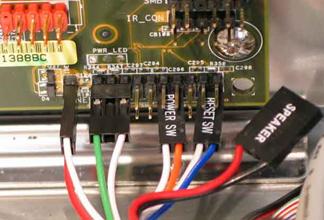
The creation of this thread is very fortuitous for me. I'm dealing with a similar issue. Pc starts for a few seconds, fans whir and leds come on, then the pc resets. No video is ever displayed and I can never make it to post. As I have reseated everything multiple times, I suspect the culprit is this reset switch cable, which has come lose from the front panel on top of the case:
ySp2QFc.jpg

Problem is, to get up there and reconnect it, I have to unscrew these sons of bitches:
d3lvW0t.jpg
and I have no idea which type of screwdriver I need. Someone please help
 
Well the only thing I really care about is the data on my hard drive. Since it's internal, how could I extract that data?

Also - looking forward - the "need a new PC" guys on gaming side are suggesting instead of buying another built PC like this one, that I order the parts and pay to have it assembled in advance. Do you guys concur? My budget is around $2k. They recommended the enthusiast build in the OP.

First what port does the hard drive use? SATA or PATA? 2006-2008 was a transition year for many mobo makers.

You can either:

1. Connect to the new desktop internally if the drive used the newer SATA port.

2. Buy a 3.5" USB enclosure or drive dock. Check the enclosure/dock is compatible with the drive.
 
I never got the first PCI-E slot of my motherboard to work, but the funny thing is the speaker won't give any signal code, it just either stops at POST or starts loading windows with a black screen as if it doesn't care a gpu is supposed to be there.
 
This is a Dell XPS 420 that I got in 2007. I added 4 sticks of ram, a USB 3.0 PCI card and an AMD Radeon HD 7700 card over the years. Everything else is stock.

Where can I get more info on the leds? There is and always has been an orange light on the mobo. It's solid orange when the PC is connected to a power source, as it's always been.

What video card did it have before or was it just onboard? Possible that the PSU is going bad and can't handle the load now. I have had to replace 2 PSU in dell XPS systems recently.

How easy is it to replace a PSU?

Really, really easy. Just follow a guide and make sure you have the cables plugged into the motherboard correctly.

Yes, on the front, 1,2,3 are all lit. 4 is not lit:


So considering the connections are good (the desktop is never moved around so things wouldn't unplug, unseat anyway), and the monitor isn't getting a signal, what could this mean?


edit: and the PSU light is solid green.

On the PSU itself is there a button next to the led?

https://www.youtube.com/watch?v=udGOe7LQJEI

I know your PC is different, but steps should be the same/similar to this video.


The creation of this thread is very fortuitous for me. I'm dealing with a similar issue. Pc starts for a few seconds, fans whir and leds come on, then the pc resets. No video is ever displayed and I can never make it to post. As I have reseated everything multiple times, I suspect the culprit is this reset switch cable, which has come lose from the front panel on top of the case:http://i.imgur.com/ySp2QFc.jpg
Problem is, to get up there and reconnect it, I have to unscrew these sons of bitches:http://i.imgur.com/d3lvW0t.jpg and I have no idea which type of screwdriver I need. Someone please help

Just disconnect the reset switch from the motherboard and see if that fixes it.
 
The creation of this thread is very fortuitous for me. I'm dealing with a similar issue. Pc starts for a few seconds, fans whir and leds come on, then the pc resets. No video is ever displayed and I can never make it to post. As I have reseated everything multiple times, I suspect the culprit is this reset switch cable, which has come lose from the front panel on top of the case
Problem is, to get up there and reconnect it, I have to unscrew these sons of bitches:and I have no idea which type of screwdriver I need. Someone please help

Can't you just disconnect the reset pin from the front panel connector on the motherboard instead?

image031.jpg

Should look like this. Refer to your Motherboard manual for which wire to pull

Well the only thing I really care about is the data on my hard drive. Since it's internal, how could I extract that data?

Also - looking forward - the "need a new PC" guys on gaming side are suggesting instead of buying another built PC like this one, that I order the parts and pay to have it assembled in advance. Do you guys concur? My budget is around $2k. They recommended the enthusiast build in the OP.

The suggestion is valid. PC gaming GAF is a helpful bunch (except when you ask about cheaper AMD CPUs for budget reasons *Grumble grumble*). But for 2K you won't run into any of those issues, you'll be able to get a *sweet* gaming rig.
 
Well the only thing I really care about is the data on my hard drive. Since it's internal, how could I extract that data?

Also - looking forward - the "need a new PC" guys on gaming side are suggesting instead of buying another built PC like this one, that I order the parts and pay to have it assembled in advance. Do you guys concur? My budget is around $2k. They recommended the enthusiast build in the OP.

To your previous question...it is generally easy to replace a power supply. Can be time consuming to route the wires but as suggested, it may be simpler to just replace the whole the thing since it is an older machine vs playing whack-a-mole replacing parts.

The hard drive would be simple if you replaced the machine. Just remove the hard drive and install it as a 2nd drive in the new machine. Take what you want off of it then remove it permanently.

As far as what new machine you get, it all depends on how important it is to save money. If you can drop the money and not feel at all bad about it then go ahead with a prebuilt machine. If not having bloatware is important, overclocking or just trying to get the most bang for your buck then build your own. If you build your own then you can reuse your mouse, keyboard and hopefully OS. Either way, you were using a 2006 machine. You obviously don't need a super high end machine to suit your needs so I doubt you'd need to spend anywhere close to $2k.
 
Well the only thing I really care about is the data on my hard drive. Since it's internal, how could I extract that data?

Also - looking forward - the "need a new PC" guys on gaming side are suggesting instead of buying another built PC like this one, that I order the parts and pay to have it assembled in advance. Do you guys concur? My budget is around $2k. They recommended the enthusiast build in the OP.

If your budget is 2K absolutely do build your own PC. That is more than enough for top of the line PC...or two.

Also, I had the same issue as you a few months ago. PC turned on and everything appeared working but turns out the PSU was still faulty. If doing your own build first buy a good PSU so see if that is indeed the case. And you connect your old hard drive to your new PC or buy a HDD dock and drag off your important files.
 
Status
Not open for further replies.
Top Bottom