• Hey Guest. Check out your NeoGAF Wrapped 2025 results here!

Indie Game Development Thread 3: Indie Jones and the Template of Doom

Hi guys.

Me and a friend are currently in the process of making an RPG. We haven't really decided on an engine yet (Unity is a maybe).

I have a question as we are planning on having a first person turn based battle system in the vein of Etrian Odyssey and Elminage. The enemies etc. are static, but not exactly pixelart from what I can tell. How would I go about making these enemy/character portraits? Are they hand drawn, then imported into a photo editing software to color?

Thanks.

These enemy and character graphics were most likely drawn digitally using a Wacom (or Wacom-like) tablet pen or tablet PC like the Surface/iPad Pro from line art to color. You'll draw lines and colors on a transparent layer (not on the background/paper layer) so that you can hide the paper/background layer when you want to save the final image. It saves a ton of time to do it this way, since you can draw directly inside the program (Clip Studio / Photoshop / whatever) you end up painting in. The only important thing is being able to save your final image into a transparency-supporting file format, usually .png for higher color depth images like these. Your original drawing doesn't have to match the resolution of the target size - this is the only real difference from retro pixelart workflow where maintaining pixel-accurate color and lines is important; it's much better to draw a much larger resolution and then save a reduced copy of the image file to match your target on-screen size based on your engine.

Optionally, you can choose to draw line art traditionally in a sketchbook, then scan the drawing, and use Photoshop or whatever program you're using to clean up and sharpen the lines and then digitally paint over the rough/ink. Or, you could do the entire painting traditionally, scan and just use image correction with a little digital manipulation to touch up blemishes or fix lines/blends. Or whatever medium the artist like working in. This takes more work since you have to cut the enemy/character drawings away from the paper background so it can be re-positioned, and not have it look too matted when drawn over your background in-game.

The final option (off the top of my head) is in fact to use a pixel art program. You'll just end up using far more colors than a retro sprite would, but since all images on a screen are just pixels, you could reproduce any image you see on a monitor if you were dedicated enough, no matter how big and complex the art. This is ultimately a variant of the digital drawing method, but more focused and time consuming for larger image sizes.

Basically, all that matters is getting your drawing/painting into your final .png image asset. How you get there is up to the artistic direction of the graphics and artist's preference. (Sorry for the long reply I tend to ramble) :)
 
Fixed the time of day issues, just gotta make the landscape material react better, that sand is way too bright

0d11f9c7f5.gif
 
These enemy and character graphics were most likely drawn digitally using a Wacom (or Wacom-like) tablet pen or tablet PC like the Surface/iPad Pro from line art to color. You'll draw lines and colors on a transparent layer (not on the background/paper layer) so that you can hide the paper/background layer when you want to save the final image. It saves a ton of time to do it this way, since you can draw directly inside the program (Clip Studio / Photoshop / whatever) you end up painting in. The only important thing is being able to save your final image into a transparency-supporting file format, usually .png for higher color depth images like these. Your original drawing doesn't have to match the resolution of the target size - this is the only real difference from retro pixelart workflow where maintaining pixel-accurate color and lines is important; it's much better to draw a much larger resolution and then save a reduced copy of the image file to match your target on-screen size based on your engine.

Optionally, you can choose to draw line art traditionally in a sketchbook, then scan the drawing, and use Photoshop or whatever program you're using to clean up and sharpen the lines and then digitally paint over the rough/ink. Or, you could do the entire painting traditionally, scan and just use image correction with a little digital manipulation to touch up blemishes or fix lines/blends. Or whatever medium the artist like working in. This takes more work since you have to cut the enemy/character drawings away from the paper background so it can be re-positioned, and not have it look too matted when drawn over your background in-game.

The final option (off the top of my head) is in fact to use a pixel art program. You'll just end up using far more colors than a retro sprite would, but since all images on a screen are just pixels, you could reproduce any image you see on a monitor if you were dedicated enough, no matter how big and complex the art. This is ultimately a variant of the digital drawing method, but more focused and time consuming for larger image sizes.

Basically, all that matters is getting your drawing/painting into your final .png image asset. How you get there is up to the artistic direction of the graphics and artist's preference. (Sorry for the long reply I tend to ramble) :)


Thank You Astrael.

I dont have a tablet to draw with, so have been drawing on paper (Really need to invest if I want to be serious about this). I guess I'll go with the scanning option for now.

What would be the best engine to use for a top down rpg if we were to release on Steam and maybe port to consoles someday? RPG Maker? (Isn't this frowned upon in terms of it being amateurish or so I heard?)
 
Thank You Astrael.

I dont have a tablet to draw with, so have been drawing on paper (Really need to invest if I want to be serious about this). I guess I'll go with the scanning option for now.

What would be the best engine to use for a top down rpg if we were to release on Steam and maybe port to consoles someday? RPG Maker? (Isn't this frowned upon in terms of it being amateurish or so I heard?)

No problem :) I definitely recommend getting a pen tablet as soon as it is affordable to, probably the best thing I ever did for myself back when I started drawing for my game. If only to help with digital touch ups after scanning your drawings.

I have a custom Monogame engine I'm still tinkering with so I haven't tried anything like RPG Maker, but RPG Maker seems to handle the core components of top down RPGs well enough from the inexpensive games I've picked up on Steam for research. Personally I feel it gets the amateurish rap because many devs (at least on Steam) I see using it stick with too many stock assets and limited custom events so their games lack an "identity," but maybe someone who's used the engine more can weigh in with more insight. I'd only worry about portability to other platforms (especially consoles), I think RPG Maker MV outputs to HTML5? I found a 2D RPG Kit for Unity with a quick google search so there might be a similar prefab engine if you prefer Unity or another framework already available?
 
Thank You Astrael.

I dont have a tablet to draw with, so have been drawing on paper (Really need to invest if I want to be serious about this). I guess I'll go with the scanning option for now.

What would be the best engine to use for a top down rpg if we were to release on Steam and maybe port to consoles someday? RPG Maker? (Isn't this frowned upon in terms of it being amateurish or so I heard?)
If you want to experiment with a pen tablet without paying too much, I highly recommend checking out Monoprice for $40-ish or less sales: https://www.monoprice.com/category/computers-and-networking/graphic-tablets

You can also go up to $60-ish on Amazon for a Bamboo tablet that might be nicer without going into the really expensive professional range.
 
Me and a friend are currently in the process of making an RPG. We haven't really decided on an engine yet (Unity is a maybe).

...

The enemies etc. are static, but not exactly pixelart from what I can tell. How would I go about making these enemy/character portraits? Are they hand drawn, then imported into a photo editing software to color?

RPGMaker is literally designed to create these types of games; if you're not targetting platforms it doesn't support its probably worth a look, because any other solution is going to involve a lot of reinventing the wheel, and as a first project its probable you want to get on with the game making part rather than the 'hammering an engine into doing what you specifically want it to' part (and will also let you encounter all the pitfalls and gotchas and reasons to go with a more flexible engine as you work).

For that kind of art, its usually all digital from the get go - sketched up in something like Illustrator (so it can be scaled infinitely without loss of detail) with a Wacom or similar, then coloured and tidied up in Photoshop.
For modern game engines, there's not really any need to make things as pixel art, its entirely a stylistic choice

e: oh I hadn't refreshed and didn't see there was a new page covering this
 
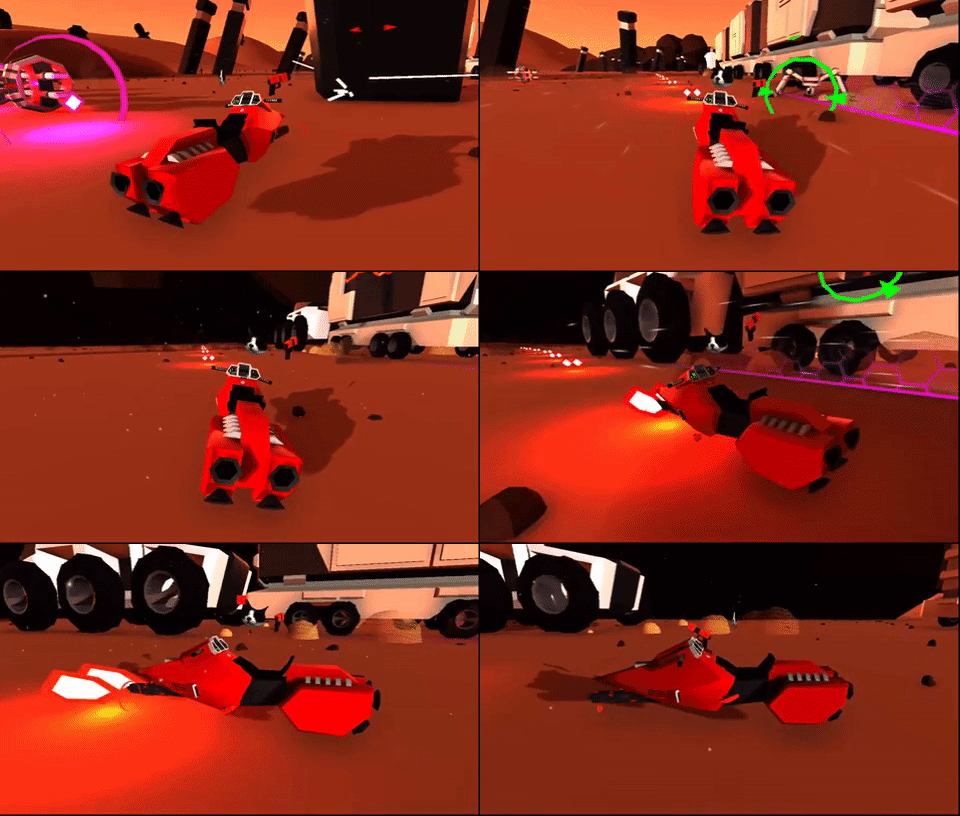
I upgraded the pathfollowing system with a few new features. Now they:
1. follow the spline more accurately according to their own offset
2. adjust their path to try and move around other racers
3. look ahead to see if the path narrows or if there are walls, and move to the center of the path if there are.
giphy.gif
 
Anyway, here's a heads-up for iOS developers - do not update your app while you're being featured on the App Store (except when you're in direct contact with Apple, I guess). We've just released a game with some friends which was appearing in Arcade and Sports subcategories as this week's selection, but after the update we've been relegated from the subcategories main page to the "full list".

(It may be because we've updated the app icon? Maybe Apple do not want us to mess with their carefully picked selection)

Just a warning, as it's definitely bad for exposure.


Update - our app has re-appeared in the featuring.
 
I'm thinking about joining the club, and although the OT is great (thanks for that, OP!), I'm lost as f*ck. I started with a basic online course of UE4, then I dropped it and started a basic online Blender course, then I got back to the UE4 course, but then I downloaded MagicaVoxel and Unity...

I... I really don't know what to do. Should I focus on 3D modeling with Blender and MagicaVoxel and try to find a job in that area and earn some money, then try other stuff latter? Or should I try going straight with the engines? I see potential in using the UE4 engine in architecture, but I don't know... I'm also a writer, so I'm thinking about making interactive books with Twine too. Can you guys give me some tips about how to start?
 
I upgraded the pathfollowing system with a few new features.

I mean... that looks like they follow the track better than I remember actual chaos did (you're the one making the totally-not-chao-garden game right?)

Can you guys give me some tips about how to start?

Are you looking to 'get into the industry', or are you looking to make a game of your own?
Because one might lead to the other, but the path to get to each is probably different...
 
I'm thinking about joining the club, and although the OT is great (thanks for that, OP!), I'm lost as f*ck. I started with a basic online course of UE4, then I dropped it and started a basic online Blender course, then I got back to the UE4 course, but then I downloaded MagicaVoxel and Unity...

I... I really don't know what to do. Should I focus on 3D modeling with Blender and MagicaVoxel and try to find a job in that area and earn some money, then try other stuff latter? Or should I try going straight with the engines? I see potential in using the UE4 engine in architecture, but I don't know... I'm also a writer, so I'm thinking about making interactive books with Twine too. Can you guys give me some tips about how to start?
What are you good at?
What do you like doing?
 
I mean... that looks like they follow the track better than I remember actual chaos did (you're the one making the totally-not-chao-garden game right?)


Are you looking to 'get into the industry', or are you looking to make a game of your own?
Because one might lead to the other, but the path to get to each is probably different...
What tips do you have in general for getting in? :)
 
Are you looking to 'get into the industry', or are you looking to make a game of your own?
Because one might lead to the other, but the path to get to each is probably different...
Well, there's no 'industry' here in Brazil, specially in this nowhere land I live, basically. :P
It would be something to be made on my own. I was thinking about a simple racing game, and I know that there are some UE4 templates that I could use, specially because I'm not really into coding. Is there something similar on Unity? Is it easier to get into than UE4?


What are you good at?
What do you like doing?
Uh... Tough question. In this gaming area, nothing, I guess. I mean, I can write a good story, I know a bit about photography, I think I can learn making textures with ease, same with 3D modeling, meaning that I have basic knowledge. The coding area is not my cup of tea, although I coded many years ago, so I can learn it back if needed, but I'd prefer to avoid it of possible.

To be honest, I think I'm the type of smart ass who reads a lot and know a bit of many things, but nothing too deeply, which means I'm an idiot. I want to git gud at something.
 
Well, there's no 'industry' here in Brazil, specially in this nowhere land I live, basically. :P
It would be something to be made on my own. I was thinking about a simple racing game, and I know that there are some UE4 templates that I could use, specially because I'm not really into coding. Is there something similar on Unity? Is it easier to get into than UE4?

Unity has a car controller 'out of the box' in its "standard assets" bundle showing an example of setting up gameobjects with the necessary components and scripts (and commented code as to what its doing) but you'll probably want to at least read up on vehicle physics to start translating things like torque values into usable 'car' things like acceleration / maxspeed.

I mean, Unity is very good to start learning with as its popular and has a number of tutorials available, but you almost certainly don't want to start making your 'big' game off the bat
 
Unity has a car controller 'out of the box' in its "standard assets" bundle showing an example of setting up gameobjects with the necessary components and scripts (and commented code as to what its doing) but you'll probably want to at least read up on vehicle physics to start translating things like torque values into usable 'car' things like acceleration / maxspeed.

I mean, Unity is very good to start learning with as its popular and has a number of tutorials available, but you almost certainly don't want to start making your 'big' game off the bat

Sure, sure. :) To be honest, my dream is to make a racing game with the good old Auto Modellista visual style.
 
If you want to experiment with a pen tablet without paying too much, I highly recommend checking out Monoprice for $40-ish or less sales: https://www.monoprice.com/category/computers-and-networking/graphic-tablets

You can also go up to $60-ish on Amazon for a Bamboo tablet that might be nicer without going into the really expensive professional range.
I second this.

I recently dropped my artist and decided to roll full solo so I opted for a cheap tablet first to see if I have some chips and if I like it. After one week I sold it and bought an Intuos Pro Medium. It's working out quite well enough although I'm crossing my fingers my art is good enough XD
 
Rex: Another Island is getting published! Pixeljam Games (Dino Run) have picked it up, and will be helping me get it on Steam (and other storefronts) later this year!

I never thought this daft little platformer would hold such appeal.

Now to figure out how to integrate steamworks....
 
Rex: Another Island is getting published! Pixeljam Games (Dino Run) have picked it up, and will be helping me get it on Steam (and other storefronts) later this year!

I never thought this daft little platformer would hold such appeal.

Now to figure out how to integrate steamworks....

Oh! Is that a consequence of the VG Club spotlight? Either way, congrats!

For steam integration, look into the Steamworks plugin by Mad Spy on the scirra plugins page - worked for me!
 
You mean this one? https://www.scirra.com/store/construct2-plugins/steam4c2-basic-2546

If so, that's totally the one we're thinking of using. Was it dififcult to get things like achivements and steam overlay working? Does steam overlay even work with C2 games?

That's the one!

Achievements were incredibly easy to implement. Overlay works too, though it has a graphical glitch for 4:3 ratio games displayed in widescreen with black sidebars: the bottom right notifications leave a trail, rather than disappear cleanly. It doesn't affect the play area at all, but as I understood it, it was rather complex to fix entirely - something to do with different versions of node webkit, I think?
 
I just started dicking around with the Godot engine. Anyone else use it? Why will I hate it after working with it a few months? It seems really perfect for what I want to do so far.
 
Anyone doing pixel art on an iPad?

A quick search seems to imply that Pixaki and Dottable are the most commonly used dedicated apps, while Procreate with custom brushes is also common.

Wondering if there's anything else I should be looking at besides the above.

The only app I ever used for pixel art on the iPad was Pixely like 3 years ago (App Store Link). Mainly cause it was cheap at $2 and I couldn't find a suitable free option. The ones you shared here seem slightly more robust, so not sure how helpful it would be. Still for the price and what I was using it for at the time (between class "sketches") it worked haha. I've moved on to my Surface and Aseprite now, so haven't kept up to date on things iPad-side :/
 
After seeing a thread about a meme game, and steam controversy, I decided to make one myself. Its gonna be short but meme tastic. I'm 16hrs in. The first 10 hours was learning how to use unity & blender. The last 6 was rigging in blender, and setting up the level.

The beginning of the game is deceptive lol. I'm sure u can tell what the theme is. Please ignore the mess on the left my excuse is that im not taking this seriously.

 
After seeing a thread about a meme game, and steam controversy, I decided to make one myself. Its gonna be short but meme tastic. I'm 16hrs in. The first 10 hours was learning how to use unity & blender. The last 6 was rigging in blender, and setting up the level.

The beginning of the game is deceptive lol. I'm sure u can tell what the theme is. Please ignore the mess on the left my excuse is that im not taking this seriously.

9eb.gif
 
Finally back working on Quests Unlimited after a several week hiatus(Ludam Dare + gout flareup really distracted me). The first offhand items are now fully implemented (fighter's/cleric's shields). Getting them up and running was actually pretty painless. I'm usually pretty bad about setting up the groundwork to make implementing new things easier but this with this game I made and effort to setup systems properly instead of winging it. The most painful part was simply creating the voxel models for the shields (which i suck at) but even that wasn't so bad. I do hope my current shields don't make it to release though, they could really be made better. I think I'm going to spend the next couple days implementing the 2 other offhand item types, the cleric weapon, and then finally add the last class (cleric). I'm also hoping that if I blather out all my plans in this thread I might actually stick to it properly instead of getting sidetracked again. This has been my biggest project to date and I find myself wanting to do everything else instead of focusing on it properly. I've got too much time and effort invested to just stop though. /journal entry
 
Please ignore the mess on the left my excuse is that im not taking this seriously.

I can't remember where I read it, but I fairly recently read an article that suggests parenting objects into empty objects for scene contents readability in Unity is actually a performance hit over just having everything as an unnested hierachy as is.
 
I can't remember where I read it, but I fairly recently read an article that suggests parenting objects into empty objects for scene contents readability in Unity is actually a performance hit over just having everything as an unnested hierachy as is.
I can't imagine not doing this. It drives me crazy when everything is just scattered everywhere.

Please share the article if you can find it. My google fu so far says it is not an issue at all, or it's so small that you should only see it when reparenting thousands of children.

I use parenting a lot so any help in clarifying the issue would be appreciated.

Edit: I found a response from Unity
Obviously, there is a cost to GameObjects and transform hierarchies. GameObjects themselves are somewhat complex in that every single one is made up of a multitude of individual objects and pieces of data. So, for every one, you are paying a cost in memory, in loading-time, and in general management overhead.

Transform hierarchies, as you say, incur a cost in computing world space matrices that is effected by the depth of the hierarchy. This computation, however, happens lazily and the result is cached.

But overall, it really depends on what you are doing. If you have a largely static setup of GameObjects but then nested deep within the hierarchy a set of rapidly moving objects, for example, you will take a bigger hit than if those rapidly moving objects were at toplevel. But whether that really matters much depends.

My advice would be to not worry too much and use GameObjects in a way that makes most sense to you. Then see if you run into bottlenecks and if so, address those.

One subtle conflict can be between organizing things for clarity and ease of use and for running optimally. For example, complex hierarchies can help work with complex scenes. In that case, you can procedurally do cleanups when building the game using scene postprocessors (EDIT: or by marking certain objects as EditorOnly).

Also, some time ago we added the option to automatically collapse GameObject hierarchies for imported models. This can save a lot and if you're interested in any nodes at all, it's usually a very specific subset of transforms that you want (e.g. for mounting a weapon to the hand and stuff like that).
tl/dr: Not a big problem. Setup your scene in a way that makes the most sense to you.
 
I honestly can't stand having everything all lumped together in a giant mess of a list. I use empties for organisation because finding anything would be a pain otherwise.
 
I use parenting a lot so any help in clarifying the issue would be appreciated.

I honestly can't stand having everything all lumped together in a giant mess of a list. I use empties for organisation because finding anything would be a pain otherwise.

I mean, I do the same, which is why it stuck in my mind as a "wait, really?" but I try not to worry about premature optimisations too much; it was more a "Well, if I'm going to be dynamically spawning things it would make more sense to not then parent them somewhere 'for book keeping' on instantiate"
 
Thanks for responding. There are a lot of pixel art apps on the store but not a lot of in-depth reviews. Even with something like Pixaki all the in-depth reviews I'm finding are for the old version from years ago.

Dottable is free with an in-app purchase to remove ads, and Pixaki has a two-week trial so I can try before buying at least. (Although with Dottable the developer also has another app called Pixelable that looks exactly the same?? ugh.)

Ah yeah I see the ad-removal prices puts Dottable at the same price as Pixely at $2, and Pixelable at $3. Looks like Pixelable is more recent of an app, since it requires iOS10 (Dottable works with iOS7+ so it'd be the only choice I have for my old iPad 3rd gen). The dev has a 30 minute video walking through Pixelable's normal usage on the website, so I'm guessing this is a fairly new release overall and probably just decided to write a whole new program to take advantage of newer iOS features... can't think of another reason other than getting a fresh review score haha. It is frustrating how poor the review quality for these productivity apps is :(
 
I think I'm more or less happy with it, but I'm still not sure where I want the side readout to go. Stay in the middle or tuck it away up top near the hud?

My vote is to keep it in the middle there. It seems more eye-catching and less cluttered versus how it would potentially look being nestled against the meters, making it easier to read that way, but still out of the way enough not to be distracting from the action. Just my opinion though :)
 
I've started yet another new project that I decided to pull out from my prototype graveyard, I'm currently feeling really unmotivated with it but maybe posting it will give me some motivation.

It's a movement based puzzle game focused around the use of iOS 3D touch as a control mechanism. Each stage has multiple single-screen puzzles you have to manoeuvre through, each time one is completed it unlocks the next until the character escapes the world he's stuck in. 3D touch is used for vertical thrust, moving your finger left and right provides horizontal movement.

First prototype iterations:
giphy.gif
giphy.gif


Next up I iterated with artwork. I Made a UI that is anchored to the character so the player wouldn't have to take their focus off of the character to see the amount of input they're putting in, since 3D touch allows for precision. Then I tried out a low-poly 3D sort of look.
giphy.gif
giphy.gif


Decided I wasn't a fan of the 3d look, plus I'm not really comfortable with 3D. I then tried out a flat 2D kind of look inspired by Alto's Adventure, which I'm a bit more fond of and more comfortable with. I also made a prototype menu with support for localisation.
giphy.gif
giphy.gif
giphy.gif


I wrote a shader to do the tree swaying, and am planning on updating it so that the trees respond to the character and sway appropriately if the player gets close to them. Was a bit of a goof with that, as it turns out if you use a fragment shader with Unity SpriteRenderers it will treat all instances of similar sprites (same scale) as one, so I wound up getting some really bonkers effects with that. I wound up writing another shader that allows me to scale the tree sprites indefinitely without weird artefacts and then tossed that onto a mesh so I could have multiple instances swaying without it freaking out.

That said, I really like the aesthetic I just don't know if I'm skilled enough to pull it off. So not sure if I'm going to keep it at this point..

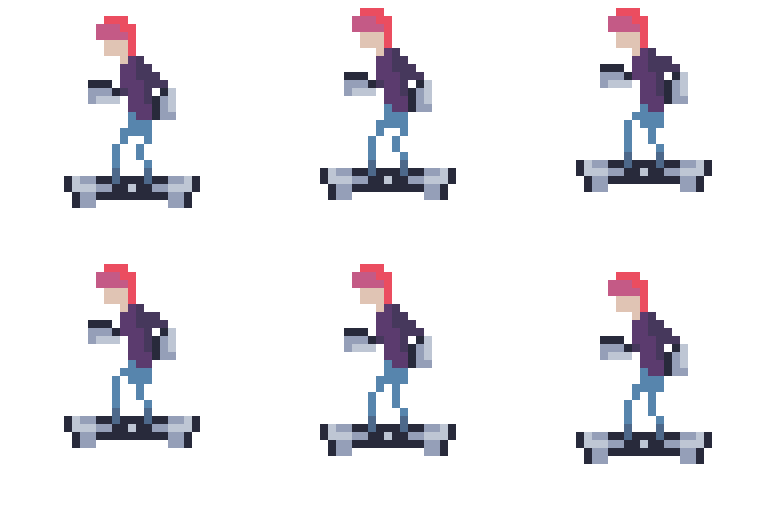
Next up I reconsidered the main character and came up with a sort of space hoverboard-dude. I figured something like that would be a bit easier to convey horizontal as well as vertical movement with. I also tried playing with particle systems a bit.
Player-256x256_idle.gif
giphy.gif


I was also doing my artwork (sans the pixel art) in Sketch, which I discovered I hate the iteration time in. And the anti-aliasing artifacts. So to fix the first portion of that I wound up making an in-editor cubic bezier mesh editor with pixel-perfect 2d collider support and obj export support, which has sped up my iteration time a lot.
giphy.gif


Aaaaand thats pretty much it. The movement/gameplay is fun, and I'm pleased with how it looks at the moment but I'm just kind of unmotivated with it at the moment. The core loop is pretty much completely finished, as in I can open > main menu > play a level > complete the level > save progress > repeat, but I just feel like I'm currently not where I need to be with my artistic ability to pull it off so I'm in a bit of a circle of perpetual attempts at art. Plus we're planning on moving apartments later this month + trying to find a daycare for my son, so time is just a bit limited at the moment.

I've written up pretty in-depth dev logs with technical info and stuff on my blog if anybody is interested in reading any of it. I'd wager the two most interesting ones are the post on the psuedo Entity-Component-System framework I wrote for this project and the localisation one.

- Introduction post
- Entity-Component-System
- UI creation
- Menu / Localisation
- Trying to find an aesthetic
- Hoverboard-dude creation
 
Aaaaand thats pretty much it. The movement/gameplay is fun, and I'm pleased with how it looks at the moment but I'm just kind of unmotivated with it at the moment. The core loop is pretty much completely finished, as in I can open > main menu > play a level > complete the level > save progress > repeat, but I just feel like I'm currently not where I need to be with my artistic ability to pull it off so I'm in a bit of a circle of perpetual attempts at art.

As someone who frequently runs into the same issue (including the prototype graveyard in the hope something really speaks to me at prototype stage) I can't really say much other than "I know those feels bro" but I probably would question why you are mixing flat 'vector style' aesthetics with pixelart...?
I think you might find a more pleasing overall aesthetic entirely sticking with one or the other (and this would extend to the UI as well) - not sure if this is actually helpful as it might lead you to think "great, now I have to do pixelart environments, fonts and UI elements" or "great, now I have to do vectorial characters and animations" too :s
 
As someone who frequently runs into the same issue (including the prototype graveyard in the hope something really speaks to me at prototype stage) I can't really say much other than "I know those feels bro" but I probably would question why you are mixing flat 'vector style' aesthetics with pixelart...?
I think you might find a more pleasing overall aesthetic entirely sticking with one or the other (and this would extend to the UI as well) - not sure if this is actually helpful as it might lead you to think "great, now I have to do pixelart environments, fonts and UI elements" or "great, now I have to do vectorial characters and animations" too :s

Ha, I was absolutely thinking the exact same thing earlier today actually. My original reasoning for it was that I wanted the player to be super crisp, and since he was going to be small I figured I would get a better result by just doing him in pixel art. I do a lot more pixel art than flat as well, so that was another reason.

That said, I was thinking about the game a lot today and came up with some ideas to de-scope the game to a more manageable state, and part of it includes switching level layouts to tile maps, so I'll just do those in pixel art from the beginning which should unify the art style.
 
Creativley, I'm in a super weird and diffcult situation currently, I'm juggling so many questions, ifs and butts in my head, it's driving me crazy and i can't sleep every night. it comes down to the story of my game.

Which could have massive implications not only in terms of sales, but my career as a proffesional creative living in Asia.

I live and work in Taiwan, the entirety of my game (apart from a Hong kong area) is going to be set in a derelict cyberpunk, photorealistic Taiwan,The game I am making, the concept has always been a ravaged Taiwan after China have invaded and tried to take it back, plot lines involving people evading the Chinese army sweeping the island, and fighting back.. Entire characters have been written around this. China invading, westerners located in Taiwan all fleeing, and only the few who love the country and have created lives here decided to stay and help defend Taiwan.. it's just yeah.

This is a HUGLEY touchy subject for China.(obviously) the second the game is released it's going to be instantly banned.. But not only that, I myself will probably be banned from being able to get a visa in China and travel there for work reasons. This would really fuck me up proffesionally.

I could totally drop the whole concept and rewrite it but my hearts telling me not to. Damn
 
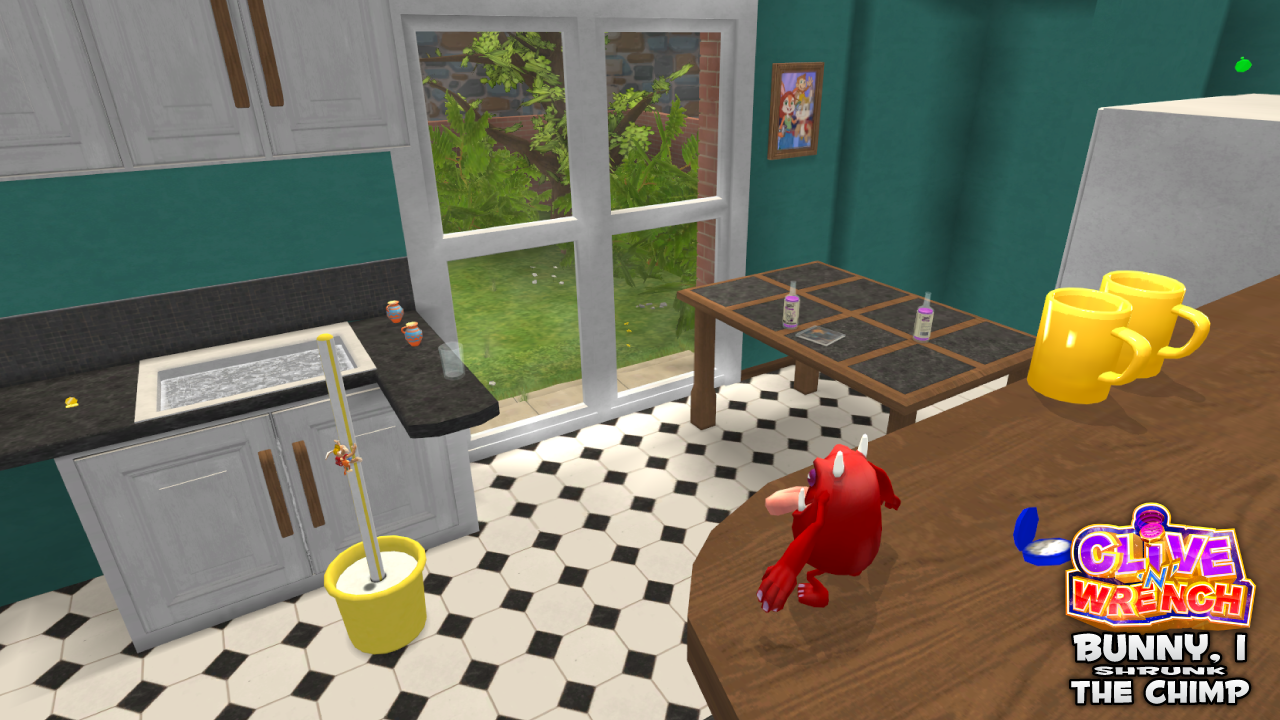
Started work on the 'tutorial' level of Clive 'N' Wrench. In which we see the time machine accidentally throw the duo into a dimension that's much larger than their own!

BunnyIShrunkScreenshot.png


Working on this is a really good excercise in analysing detail. Difficult to get my head around the scale differences, but I'm getting there!
 
Creativley, I'm in a super weird and diffcult situation currently, I'm juggling so many questions, ifs and butts in my head, it's driving me crazy and i can't sleep every night. it comes down to the story of my game.

Which could have massive implications not only in terms of sales, but my career as a proffesional creative living in Asia.

I live and work in Taiwan, the entirety of my game (apart from a Hong kong area) is going to be set in a derelict cyberpunk, photorealistic Taiwan,The game I am making, the concept has always been a ravaged Taiwan after China have invaded and tried to take it back, plot lines involving people evading the Chinese army sweeping the island, and fighting back.. Entire characters have been written around this. China invading, westerners located in Taiwan all fleeing, and only the few who love the country and have created lives here decided to stay and help defend Taiwan.. it's just yeah.

This is a HUGLEY touchy subject for China.(obviously) the second the game is released it's going to be instantly banned.. But not only that, I myself will probably be banned from being able to get a visa in China and travel there for work reasons. This would really fuck me up proffesionally.

I could totally drop the whole concept and rewrite it but my hearts telling me not to. Damn
Why not do what programmers and the like did back in the NES/SNES days and remove your real name from the equation by using a pseudo-name?

Or are you dead-set on having this on your resume? 'Cuz if that's the case, I don't think you can have your cake and eat it too.
 
Top Bottom